How to Build an AI Video Course Generator with Python
Turn PowerPoint slides into narrated video courses using LLMs, text-to-speech, and FFmpeg — fully automated.

中文版 / Chinese Version: This article is adapted from a Chinese original on CSDN. 阅读中文原文 →
Recording a high-quality video course is painful. You need a quiet room, a flawless delivery, and the patience to re-record every time you stumble over a sentence. Multiply that by a hundred slides across a dozen courses, and you have a real productivity problem.
What if you could upload a PowerPoint deck and get back a fully narrated video? That is exactly what we are going to build in this article: an AI-powered video course generator that takes a PPT file and produces a production-ready MP4 — no microphone required.
The pipeline has five stages: extract text and images from slides, generate a narration script with an LLM, synthesize speech with a TTS engine, and compose the final video with FFmpeg.
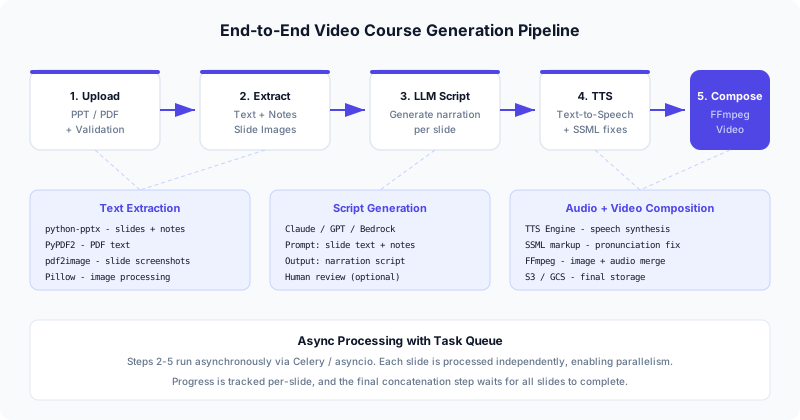
Architecture Overview
The system is deliberately cloud-agnostic. You can run it entirely on a single machine or distribute it across cloud services:
| Component | Local Option | Cloud Option |
|---|---|---|
| File storage | Local filesystem | S3, GCS, Azure Blob |
| Text extraction | python-pptx, PyPDF2 | Same (runs in your backend) |
| LLM script generation | Ollama, llama.cpp | Bedrock (Claude), OpenAI, Azure OpenAI |
| TTS synthesis | CosyVoice, ChatTTS | AWS Polly, Azure TTS, Google TTS |
| Video composition | FFmpeg | Same (runs in your backend) |
| Task queue | In-process asyncio | Celery + Redis, SQS |
The backend is a FastAPI application. Each course generation job is processed asynchronously — the user uploads a PPT, gets back a job ID, and polls for progress. Internally, each slide is processed independently, so you can parallelize TTS and image rendering across all slides.
POST /api/courses/{course_id}/generate
  → Validate PPT file
  → Create async job
  → Return job_id

GET /api/jobs/{job_id}
  → Return { status, progress, video_url }
Step 1 — Extracting Text and Images from PPT
The first challenge is pulling structured content from a PowerPoint file. We need two things per slide: the text content (title, body, and speaker notes) and a screenshot of the slide as a PNG image.
Data model
from dataclasses import dataclass
from typing import Optional

@dataclass
class SlideContent:
    """Extracted content from a single slide."""
    index: int
    text: str
    notes: str
    image_path: Optional[str] = None
Safe file handling
The original implementation had an SSRF vulnerability — it fetched PPT files from arbitrary URLs using requests.get() with no validation. Anyone could point it at an internal service (http://169.254.169.254/latest/meta-data/) and exfiltrate cloud credentials.
Here is a hardened version that validates the upload locally:
import io
import tempfile
import os
from pathlib import Path
from typing import List

from pptx import Presentation
from pdf2image import convert_from_path
from fastapi import UploadFile, HTTPException

# Maximum file size: 100 MB
MAX_FILE_SIZE = 100 * 1024 * 1024
ALLOWED_EXTENSIONS = {".pptx", ".ppt", ".pdf"}


def validate_upload(file: UploadFile) -> bytes:
    """Validate uploaded file before processing."""
    # Check extension
    ext = Path(file.filename).suffix.lower()
    if ext not in ALLOWED_EXTENSIONS:
        raise HTTPException(
            status_code=400,
            detail=f"Unsupported file type: {ext}. Allowed: {ALLOWED_EXTENSIONS}",
        )

    # Read with size limit
    content = file.file.read()
    if len(content) > MAX_FILE_SIZE:
        raise HTTPException(
            status_code=400,
            detail=f"File too large. Maximum size: {MAX_FILE_SIZE // (1024*1024)} MB",
        )

    return content


def extract_slides_from_pptx(content: bytes) -> List[SlideContent]:
    """Extract text, notes, and images from a PPTX file.

    Returns a list of SlideContent, one per slide.
    """
    file_obj = io.BytesIO(content)
    presentation = Presentation(file_obj)

    slides: List[SlideContent] = []
    for idx, slide in enumerate(presentation.slides):
        # Collect all text from shapes
        text_parts = []
        for shape in slide.shapes:
            if hasattr(shape, "text") and shape.text.strip():
                text_parts.append(shape.text.strip())
        slide_text = "\n".join(text_parts)

        # Extract speaker notes
        notes_text = ""
        if slide.has_notes_slide:
            notes_slide = slide.notes_slide
            notes_text = notes_slide.notes_text_frame.text.strip()

        slides.append(SlideContent(
            index=idx,
            text=slide_text,
            notes=notes_text,
        ))

    return slides
Converting slides to images
PowerPoint files do not render natively in Python, so we convert to PDF first (using LibreOffice headless) and then rasterize each page:
import subprocess

def pptx_to_images(content: bytes, output_dir: str, dpi: int = 200) -> List[str]:
    """Convert PPTX to PNG images via LibreOffice + pdf2image.

    Returns a list of image file paths, one per slide.
    """
    with tempfile.NamedTemporaryFile(suffix=".pptx", delete=False) as tmp:
        tmp.write(content)
        tmp_path = tmp.name

    try:
        # Convert PPTX → PDF using LibreOffice
        subprocess.run(
            [
                "libreoffice", "--headless", "--convert-to", "pdf",
                "--outdir", output_dir, tmp_path,
            ],
            check=True,
            timeout=120,
            capture_output=True,
        )

        pdf_path = os.path.join(
            output_dir,
            Path(tmp_path).stem + ".pdf",
        )

        # Convert PDF → PNG images
        images = convert_from_path(pdf_path, dpi=dpi)
        image_paths = []
        for idx, image in enumerate(images):
            image_path = os.path.join(output_dir, f"slide_{idx:03d}.png")
            image.save(image_path, "PNG")
            image_paths.append(image_path)

        return image_paths
    finally:
        os.unlink(tmp_path)
Key improvement over the original: We never fetch files from user-supplied URLs. The file is uploaded directly via FastAPI’s UploadFile, validated for type and size, and processed in a temporary directory that is cleaned up afterward.
Step 2 — Generating Narration Scripts with an LLM
Raw slide text is not a good narration script. A slide might say “Q3 Revenue: $4.2M (+18% YoY)” — but the narrator should say something like “In Q3, we reached 4.2 million dollars in revenue, an 18 percent increase year over year.”
We use an LLM to transform slide content into natural spoken language.
import json
from typing import List

import boto3

bedrock = boto3.client("bedrock-runtime", region_name="us-east-1")

SCRIPT_PROMPT = """You are a professional course narrator. Given the slide content
and speaker notes below, write a natural narration script for this slide.

Rules:
- Write in a conversational teaching tone, as if lecturing to students
- Expand abbreviations and acronyms on first use
- Spell out numbers in a speakable way (e.g., "$4.2M" → "4.2 million dollars")
- Keep the script between 30-120 seconds when read aloud (~75-300 words)
- Do NOT include stage directions or markup — just the spoken text
- If speaker notes are provided, use them as the primary guide for content

Slide text:
{slide_text}

Speaker notes:
{notes}

Narration script:"""


async def generate_script_for_slide(
    slide: SlideContent,
    model_id: str = "us.anthropic.claude-sonnet-4-6-v1",
) -> str:
    """Generate a narration script for a single slide using Bedrock."""
    prompt = SCRIPT_PROMPT.format(
        slide_text=slide.text or "(no text on this slide)",
        notes=slide.notes or "(no speaker notes)",
    )

    response = bedrock.invoke_model(
        modelId=model_id,
        body=json.dumps({
            "anthropic_version": "bedrock-2023-05-31",
            "max_tokens": 1024,
            "messages": [{"role": "user", "content": prompt}],
        }),
    )

    result = json.loads(response["body"].read())
    return result["content"][0]["text"].strip()


async def generate_all_scripts(
    slides: List[SlideContent],
    model_id: str = "us.anthropic.claude-sonnet-4-6-v1",
) -> List[str]:
    """Generate narration scripts for all slides.

    Processes sequentially to respect API rate limits.
    For higher throughput, use asyncio.gather with a semaphore.
    """
    import asyncio

    semaphore = asyncio.Semaphore(5)  # Max 5 concurrent requests

    async def generate_with_limit(slide: SlideContent) -> str:
        async with semaphore:
            return await generate_script_for_slide(slide, model_id)

    scripts = await asyncio.gather(
        *[generate_with_limit(s) for s in slides]
    )
    return list(scripts)
Prompt engineering tips
The quality of the narration script depends heavily on the prompt. Here are patterns that work well:
- Include speaker notes as primary context. If the instructor wrote notes, they contain the actual teaching content. The slide text is usually just bullet points.
- Set explicit length targets. Without constraints, the LLM tends to generate either too little (just rephrasing bullet points) or too much (a 5-minute monologue for a simple title slide).
- Ask for speakable output. Remind the model that “$4.2M” needs to become “4.2 million dollars” and “YoY” needs to become “year over year.”
- Provide course context. For multi-slide courses, pass the overall course title and a summary of preceding slides so the LLM maintains narrative continuity.
Step 3 — Text-to-Speech Synthesis
This is where things get interesting. You need a TTS engine that sounds natural, handles technical jargon, and does not cost a fortune at scale.
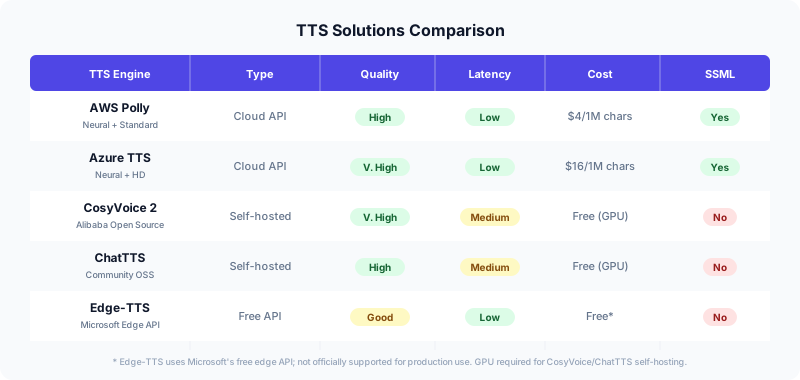
Option A: AWS Polly (Cloud, Production-Ready)
AWS Polly is the easiest to get started with. It supports SSML for fine-tuned pronunciation, has neural voices that sound genuinely natural, and costs $4 per million characters.
import boto3

polly = boto3.client("polly", region_name="us-east-1")


def synthesize_speech_polly(
    text: str,
    output_path: str,
    voice_id: str = "Matthew",
    engine: str = "neural",
) -> str:
    """Synthesize speech using AWS Polly.

    Returns the path to the output MP3 file.
    """
    response = polly.synthesize_speech(
        Text=text,
        OutputFormat="mp3",
        VoiceId=voice_id,
        Engine=engine,
    )

    with open(output_path, "wb") as f:
        f.write(response["AudioStream"].read())

    return output_path
Option B: Edge-TTS (Free, Good Quality)
Edge-TTS is a Python package that uses Microsoft Edge’s free TTS API. It is surprisingly good for a free option, though it is not officially supported for production use.
import asyncio
import edge_tts


async def synthesize_speech_edge(
    text: str,
    output_path: str,
    voice: str = "en-US-GuyNeural",
) -> str:
    """Synthesize speech using Edge-TTS (free)."""
    communicate = edge_tts.Communicate(text, voice)
    await communicate.save(output_path)
    return output_path
Option C: CosyVoice 2 (Self-Hosted, Open Source)
Alibaba’s CosyVoice 2 is the most impressive open-source TTS model available. It supports voice cloning, emotional control, and produces remarkably human-like speech. The trade-off is that you need a GPU to run it.
# Requires: pip install cosyvoice
from cosyvoice.cli.cosyvoice import CosyVoice
from cosyvoice.utils.file_utils import load_wav
import torchaudio


def synthesize_speech_cosyvoice(
    text: str,
    output_path: str,
    model_dir: str = "pretrained_models/CosyVoice2-0.5B",
    speaker: str = "English Male",
) -> str:
    """Synthesize speech using CosyVoice 2 (self-hosted).

    Requires a GPU with at least 4 GB VRAM.
    """
    model = CosyVoice(model_dir)

    # Use built-in speaker
    output = model.inference_sft(text, speaker)

    # Save to file
    torchaudio.save(output_path, output["tts_speech"], 22050)
    return output_path
Pronunciation Correction with SSML
Technical content is full of abbreviations and domain-specific terms that TTS engines mispronounce. SSML (Speech Synthesis Markup Language) lets you fix this.
Common patterns that need correction:
<!-- Acronyms: spell out letter by letter -->
<speak>
  Deploy your app to
  <say-as interpret-as="characters">ECS</say-as>
  using
  <say-as interpret-as="characters">CDK</say-as>.
</speak>

<!-- Version numbers -->
<speak>
  Python <say-as interpret-as="characters">3.12</say-as>
  introduced several new features.
</speak>

<!-- Custom pronunciation for brand names -->
<speak>
  <phoneme alphabet="ipa" ph="kuːbərˈnɛtiːz">Kubernetes</phoneme>
  orchestrates your containers.
</speak>

<!-- Pauses for readability -->
<speak>
  First, we extract the text.
  <break time="500ms"/>
  Then, we generate the narration script.
</speak>
In practice, you want a pronunciation dictionary — a mapping of terms to their SSML-corrected versions. Apply it as a preprocessing step before sending text to any TTS engine:
import re
from typing import Dict

# Pronunciation corrections: plain text → SSML replacement
PRONUNCIATION_FIXES: Dict[str, str] = {
    "ECS": '<say-as interpret-as="characters">ECS</say-as>',
    "CDK": '<say-as interpret-as="characters">CDK</say-as>',
    "S3": '<say-as interpret-as="characters">S3</say-as>',
    "API": '<say-as interpret-as="characters">API</say-as>',
    "SDK": '<say-as interpret-as="characters">SDK</say-as>',
    "GPU": '<say-as interpret-as="characters">GPU</say-as>',
    "Kubernetes": '<phoneme alphabet="ipa" ph="kuːbərˈnɛtiːz">Kubernetes</phoneme>',
    "nginx": '<phoneme alphabet="ipa" ph="ɛndʒɪnˈɛks">nginx</phoneme>',
}


def apply_pronunciation_fixes(text: str, fixes: Dict[str, str] = None) -> str:
    """Wrap text in SSML and apply pronunciation corrections.

    Only applies to TTS engines that support SSML (Polly, Azure).
    """
    if fixes is None:
        fixes = PRONUNCIATION_FIXES

    for term, replacement in fixes.items():
        # Word-boundary matching to avoid partial replacements
        text = re.sub(
            rf"\b{re.escape(term)}\b",
            replacement,
            text,
        )

    return f"<speak>{text}</speak>"
Step 4 — Video Composition with FFmpeg
This is the piece that the original article left as a black box (“use a cloud video service”). In reality, FFmpeg handles this beautifully and runs anywhere.
The core idea: for each slide, we have a PNG image and an MP3 audio file. We need to create a video segment that shows the image for the exact duration of the audio, then concatenate all segments into a single MP4.
Composing a single slide
import subprocess
import json


def get_audio_duration(audio_path: str) -> float:
    """Get the duration of an audio file in seconds using ffprobe."""
    result = subprocess.run(
        [
            "ffprobe", "-v", "quiet",
            "-print_format", "json",
            "-show_format",
            audio_path,
        ],
        capture_output=True,
        text=True,
        check=True,
    )
    info = json.loads(result.stdout)
    return float(info["format"]["duration"])


def compose_slide_video(
    image_path: str,
    audio_path: str,
    output_path: str,
    resolution: str = "1920x1080",
) -> str:
    """Create a video segment from a slide image and narration audio.

    The video shows the slide image for the exact duration of the audio.
    """
    duration = get_audio_duration(audio_path)

    subprocess.run(
        [
            "ffmpeg", "-y",
            # Input: loop the image for the audio duration
            "-loop", "1",
            "-i", image_path,
            # Input: the narration audio
            "-i", audio_path,
            # Video settings
            "-c:v", "libx264",
            "-tune", "stillimage",
            "-pix_fmt", "yuv420p",
            "-vf", f"scale={resolution}:force_original_aspect_ratio=decrease,"
                   f"pad={resolution}:(ow-iw)/2:(oh-ih)/2:black",
            # Audio settings
            "-c:a", "aac",
            "-b:a", "192k",
            # Duration: match audio length
            "-t", str(duration),
            "-shortest",
            output_path,
        ],
        check=True,
        capture_output=True,
        timeout=300,
    )

    return output_path
Concatenating all slides into a final video
def concatenate_videos(
    video_paths: List[str],
    output_path: str,
) -> str:
    """Concatenate multiple video segments into a single MP4.

    Uses FFmpeg's concat demuxer for lossless concatenation
    (all segments must have the same codec and resolution).
    """
    # Write the concat list file
    list_path = output_path + ".txt"
    with open(list_path, "w") as f:
        for path in video_paths:
            # FFmpeg concat requires escaped single quotes in paths
            safe_path = path.replace("'", "'\\''")
            f.write(f"file '{safe_path}'\n")

    try:
        subprocess.run(
            [
                "ffmpeg", "-y",
                "-f", "concat",
                "-safe", "0",
                "-i", list_path,
                "-c", "copy",
                output_path,
            ],
            check=True,
            capture_output=True,
            timeout=600,
        )
        return output_path
    finally:
        os.unlink(list_path)
The full pipeline
Putting it all together into an async pipeline:
import asyncio
import tempfile
import os
from typing import Optional, Callable


async def generate_course_video(
    pptx_content: bytes,
    output_path: str,
    tts_engine: str = "polly",
    model_id: str = "us.anthropic.claude-sonnet-4-6-v1",
    voice_id: str = "Matthew",
    on_progress: Optional[Callable[[int, int, str], None]] = None,
) -> str:
    """Full pipeline: PPTX bytes → MP4 video.

    Args:
        pptx_content: Raw bytes of the uploaded PPTX file.
        output_path: Where to write the final MP4.
        tts_engine: "polly", "edge", or "cosyvoice".
        model_id: Bedrock model ID for script generation.
        voice_id: Voice ID for the TTS engine.
        on_progress: Callback(current_slide, total_slides, stage).

    Returns:
        Path to the generated MP4 video.
    """
    work_dir = tempfile.mkdtemp(prefix="course_")

    try:
        # Step 1: Extract text and images
        if on_progress:
            on_progress(0, 0, "extracting")

        slides = extract_slides_from_pptx(pptx_content)
        image_paths = pptx_to_images(pptx_content, work_dir)

        # Attach image paths to slide objects
        for slide, img_path in zip(slides, image_paths):
            slide.image_path = img_path

        total = len(slides)

        # Step 2: Generate narration scripts
        if on_progress:
            on_progress(0, total, "generating_scripts")

        scripts = await generate_all_scripts(slides, model_id)

        # Step 3: Synthesize speech for each slide
        segment_paths = []
        for idx, (slide, script) in enumerate(zip(slides, scripts)):
            if on_progress:
                on_progress(idx + 1, total, "synthesizing")

            audio_path = os.path.join(work_dir, f"audio_{idx:03d}.mp3")

            if tts_engine == "polly":
                synthesize_speech_polly(script, audio_path, voice_id)
            elif tts_engine == "edge":
                await synthesize_speech_edge(script, audio_path)
            else:
                raise ValueError(f"Unsupported TTS engine: {tts_engine}")

            # Step 4: Compose video segment
            if on_progress:
                on_progress(idx + 1, total, "composing")

            segment_path = os.path.join(work_dir, f"segment_{idx:03d}.mp4")
            compose_slide_video(slide.image_path, audio_path, segment_path)
            segment_paths.append(segment_path)

        # Step 5: Concatenate all segments
        if on_progress:
            on_progress(total, total, "concatenating")

        concatenate_videos(segment_paths, output_path)

        return output_path

    finally:
        # Clean up temporary files
        import shutil
        shutil.rmtree(work_dir, ignore_errors=True)
Async Job Processing with FastAPI
For a production deployment, you do not want to block the HTTP request while generating a 30-minute video. Here is how to wire up the pipeline with FastAPI’s background tasks and a simple in-memory job tracker (replace with Redis or a database for production):
import uuid
from fastapi import FastAPI, UploadFile, BackgroundTasks
from fastapi.responses import JSONResponse

app = FastAPI()

# In production, use Redis or a database
jobs: dict = {}


@app.post("/api/courses/generate")
async def create_video(
    file: UploadFile,
    background_tasks: BackgroundTasks,
    tts_engine: str = "polly",
):
    """Upload a PPTX and start video generation."""
    content = validate_upload(file)

    job_id = str(uuid.uuid4())
    output_path = f"/tmp/videos/{job_id}.mp4"
    os.makedirs(os.path.dirname(output_path), exist_ok=True)

    jobs[job_id] = {
        "status": "processing",
        "progress": 0,
        "total": 0,
        "stage": "queued",
        "video_url": None,
        "error": None,
    }

    def update_progress(current: int, total: int, stage: str):
        jobs[job_id].update({
            "progress": current,
            "total": total,
            "stage": stage,
        })

    async def run_pipeline():
        try:
            await generate_course_video(
                content, output_path,
                tts_engine=tts_engine,
                on_progress=update_progress,
            )
            jobs[job_id]["status"] = "completed"
            jobs[job_id]["video_url"] = f"/api/videos/{job_id}.mp4"
        except Exception as e:
            jobs[job_id]["status"] = "failed"
            jobs[job_id]["error"] = str(e)

    background_tasks.add_task(run_pipeline)

    return JSONResponse(
        status_code=202,
        content={"job_id": job_id, "status": "processing"},
    )


@app.get("/api/jobs/{job_id}")
async def get_job_status(job_id: str):
    """Check the status of a video generation job."""
    if job_id not in jobs:
        raise HTTPException(status_code=404, detail="Job not found")
    return jobs[job_id]
Comparing TTS Solutions in Depth
Choosing the right TTS engine is the most consequential decision in this system. Here is what I learned after testing all five options.
AWS Polly
Best for: Production deployments on AWS where you need reliability and SSML support.
Polly’s neural voices (especially “Matthew” and “Joanna” for English) are quite good. The SSML support is comprehensive — you can control pronunciation, pauses, emphasis, and speaking rate. At $4 per million characters, it is affordable for most use cases.
The main limitation is voice variety. You get a fixed set of voices with no customization beyond SSML tweaks.
Azure Neural TTS
Best for: Maximum voice quality and the widest language support.
Azure’s HD neural voices are arguably the best-sounding cloud TTS available. They also have the broadest language and locale coverage. The downside is cost — $16 per million characters for HD voices, four times Polly’s price.
CosyVoice 2
Best for: Projects that need voice cloning or custom voice styles.
Alibaba’s open-source CosyVoice 2 model is remarkable. It supports zero-shot voice cloning (provide a 10-second sample, get a matching voice), emotional control, and produces very natural-sounding speech. It is free to use, but you need a GPU with at least 4 GB VRAM for inference.
The main trade-off is operational complexity. You are running an ML model in production, which means managing GPU instances, handling model loading times, and dealing with inference latency (typically 0.5-2x real-time on a consumer GPU).
ChatTTS
Best for: Chinese-language content and experimental projects.
ChatTTS is a community-driven open-source model that excels at Chinese speech synthesis. It can add natural fillers (“um,” “well”) and has a distinctive conversational quality. However, it is less polished than CosyVoice for English content and has no SSML support.
Edge-TTS
Best for: Prototyping and personal projects where cost is the primary concern.
Edge-TTS is essentially free — it uses the same TTS API that Microsoft Edge’s read-aloud feature uses. The quality is surprisingly good (it uses Azure Neural voices under the hood), but it is not officially supported for production use. Rate limits are undocumented and could change at any time.
Production Hardening
Before deploying this to real users, there are several things to address.
Error handling per slide
Do not let one failed slide kill the entire job. Wrap each slide’s processing in a try/except and continue:
async def process_slide_safe(
    slide: SlideContent,
    script: str,
    idx: int,
    work_dir: str,
    tts_engine: str,
) -> Optional[str]:
    """Process a single slide, returning None on failure."""
    try:
        audio_path = os.path.join(work_dir, f"audio_{idx:03d}.mp3")
        segment_path = os.path.join(work_dir, f"segment_{idx:03d}.mp4")

        if tts_engine == "polly":
            synthesize_speech_polly(script, audio_path)
        elif tts_engine == "edge":
            await synthesize_speech_edge(script, audio_path)

        compose_slide_video(slide.image_path, audio_path, segment_path)
        return segment_path

    except Exception as e:
        logger.error(f"Failed to process slide {idx}: {e}")
        return None  # Skip this slide in final video
Memory management for large files
A 100-slide PPTX with embedded images can easily be 500 MB. The pdf2image library loads all pages into memory simultaneously. For large files, process in batches:
def pptx_to_images_batched(
    content: bytes,
    output_dir: str,
    batch_size: int = 10,
    dpi: int = 150,
) -> List[str]:
    """Convert PPTX to images in batches to limit memory usage."""
    # ... convert to PDF first ...

    from PyPDF2 import PdfReader
    reader = PdfReader(pdf_path)
    total_pages = len(reader.pages)

    image_paths = []
    for start in range(0, total_pages, batch_size):
        end = min(start + batch_size, total_pages)
        images = convert_from_path(
            pdf_path,
            dpi=dpi,
            first_page=start + 1,  # 1-indexed
            last_page=end,
        )
        for idx, image in enumerate(images):
            path = os.path.join(output_dir, f"slide_{start + idx:03d}.png")
            image.save(path, "PNG")
            image_paths.append(path)

        # Let GC reclaim memory between batches
        del images

    return image_paths
Temporary file cleanup
Always use tempfile.mkdtemp() with a try/finally block or Python’s tempfile.TemporaryDirectory context manager. The original code had a manual cleanup loop that could leave orphaned files on errors.
Extending the System
Once the basic pipeline works, there are several natural extensions:
Human-in-the-loop editing. After script generation, present the scripts in a web UI for review. Let instructors edit, reorder, or regenerate individual slides before committing to TTS.
Subtitle generation. FFmpeg can burn subtitles into the video. Generate an SRT file from the narration scripts (with timestamps derived from audio durations) and overlay it:
ffmpeg -i video.mp4 -vf "subtitles=subs.srt:force_style='FontSize=24'" output.mp4Background music. Mix in low-volume background music using FFmpeg’s amix filter:
ffmpeg -i narration.mp3 -i bgmusic.mp3 \
  -filter_complex "[1:a]volume=0.1[bg];[0:a][bg]amix=inputs=2:duration=first" \
  mixed.mp3
Chapter markers. Embed chapter metadata in the MP4 so viewers can jump between slides in compatible players.
Wrapping Up
Building an AI video course generator is a satisfying project because each piece is well-understood — PPT parsing, LLM prompting, TTS synthesis, FFmpeg composition — but combining them into a reliable pipeline requires careful attention to error handling, memory management, and async processing.
The key architectural decisions are:
- Process slides independently. This enables parallelism and fault isolation.
- Use an async job queue. Video generation is slow; never block the HTTP request.
- Choose your TTS engine based on your constraints. AWS Polly for production reliability, Edge-TTS for prototyping, CosyVoice for maximum quality and voice cloning.
- Validate inputs aggressively. File type checks, size limits, and no URL-based file fetching.
- Use FFmpeg directly instead of proprietary cloud video services. It is more flexible, portable, and free.
The complete pipeline can process a 50-slide course in about 10-15 minutes (dominated by TTS synthesis), producing a professional-looking video that sounds like a human narrator — without anyone ever stepping in front of a microphone.
References
- Amazon Nova User Guide — AWS Documentation
- edge-tts — GitHub
- FFmpeg documentation — FFmpeg