Big Data on AWS Deep Dive (Part 2): S3, Parquet, and Apache Iceberg Explained
Master the storage foundation of modern data lakes — S3 object storage, Parquet columnar format, and how Iceberg adds ACID transactions to files on S3.
This chapter covers two foundational topics of data lakes in depth:
- Where data lives (S3)
- What format data takes (Parquet columnar storage + Iceberg table format)
These two decisions underpin every higher-level service — Athena, Glue, SageMaker, and beyond.
Amazon S3: The Bedrock of the Data Lake
What It Is
S3 (Simple Storage Service) is AWS’s earliest and most important service (launched 2006). At its core, it is a globally distributed object store: you upload a file of any size (up to 5 TB per object), assign it a key (path), and retrieve it later using that key.
s3://my-bucket/warehouse/ods/orders/dt=2026-05-10/part-0001.parquet
   |           |                            |             |
   bucket      path prefix                  partition dir  file
Key Properties (Why Data Lakes Choose S3)
| Property | Details | What It Means for a Data Lake |
|---|---|---|
| 11 nines durability | Probability of losing one object per year: ~0.000000001% | Data won’t disappear |
| Virtually unlimited scale | A single bucket can hold EB-scale data with automatic sharding | PB-scale data needs no manual sharding |
| Pay-per-use | You pay only for the GB stored | Archiving historical data is cheap |
| Strong consistency (since 2020) | A GET immediately after a PUT always returns the latest version | No stale-read surprises |
| Multiple storage classes (Standard / IA / Glacier) | Hot-to-cold tiering | Old data automatically moves to cheaper tiers |
| API-friendly | HTTP REST + AWS SDKs | Every engine can read and write |
Storage Classes and Hot/Cold Tiering
S3 isn’t a single tier — it offers multiple storage classes with price and retrieval latency varying by orders of magnitude:
| Storage Class | Price (us-east-1) | Retrieval Latency | Best For |
|---|---|---|---|
| S3 Standard | ~$0.023/GB/mo | Milliseconds | Current hot data |
| S3 Intelligent-Tiering | ~$0.023/GB/mo (auto-downtiers) | Milliseconds to minutes | Default recommendation when access patterns are unknown |
| S3 Standard-IA (Infrequent Access) | ~$0.0125/GB/mo | Milliseconds | Occasional access |
| S3 Glacier Instant Retrieval | ~$0.004/GB/mo | Milliseconds | Monthly access |
| S3 Glacier Flexible / Deep Archive | $0.0036 / $0.00099/GB/mo | Minutes to hours | Regulatory archives |
Practical tip: Enable Intelligent-Tiering as the default for all warehouse buckets. Let S3 automatically move objects based on access frequency. One configuration change can save 30-50% annually.
S3 = “File System” or “Object Store”?
Many people instinctively treat S3 like a file system. S3 is not a file system — it is a key-value store that only supports whole-object reads and writes. You cannot append or modify a single byte in place.
This constraint drives many upstream design decisions:
- Data lake files follow a write-once, read-many (WORM) pattern
- Want to UPDATE a single row? You must rewrite the entire file — which is precisely why you need Iceberg to manage this (see the Iceberg section below)
About S3 Tables (GA December 2024, Evolving Through 2025-2026)
- Standard S3: you can see all
.parquetfiles in the console - S3 Tables: AWS-native “Iceberg table storage” — the console shows tables, not underlying files. AWS automatically handles compaction, expired snapshot cleanup, and metadata management
2025-2026 new capabilities:
- Cross-region replication (DR)
- Intelligent-Tiering support (automatic hot/cold tiering)
- Bedrock Knowledge Bases can read S3 Tables directly for structured retrieval
- Bidirectional sync with Glue Data Catalog
The Zero-ETL to SageMaker Lakehouse path in production architectures lands on S3 Tables.
File Formats: CSV vs JSON vs Parquet vs ORC
S3 is a file store — but what format lives inside those files matters enormously.
Candidate Formats
| Format | Type | Storage Efficiency | Query Performance | Human Readability |
|---|---|---|---|---|
| CSV | Row-oriented text | Low | Low | Excellent (human-readable) |
| JSON / JSON Lines | Row-oriented text | Low | Low | Good |
| Avro | Row-oriented binary | Medium | Medium | Low |
| Parquet | Columnar binary | Very High | Very High | Low |
| ORC | Columnar binary | Very High | High | Low |
Verdict: For data warehouses and data lakes, default to Parquet.
Why? Because analytical queries primarily select a few columns, scan massive rows, and aggregate — exactly what columnar storage excels at.
Row Store vs Column Store: Why OLAP Demands Columnar
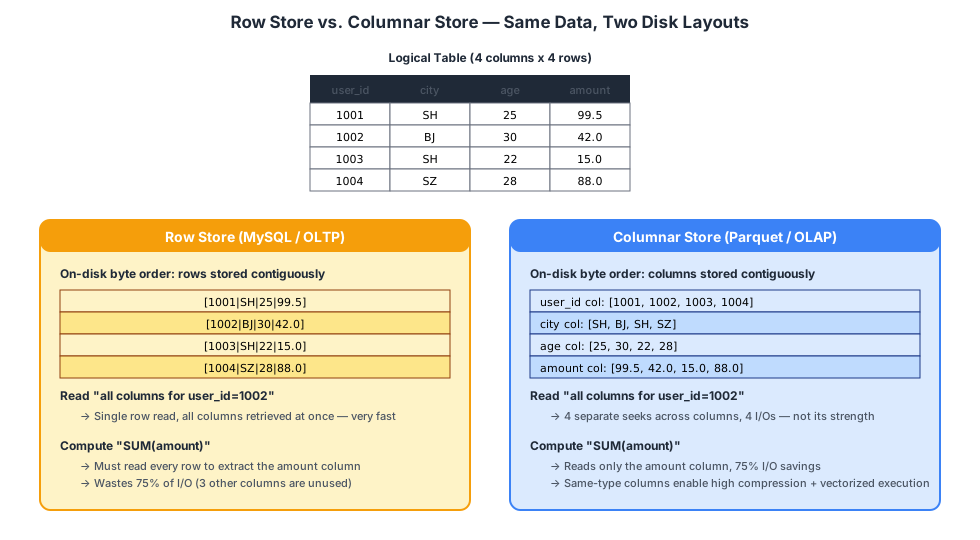
A Concrete Example
Imagine an events table with 100 million rows and 50 columns. You run:
SELECT city, SUM(amount) FROM events WHERE dt='2026-05-01' GROUP BY city;Row store (CSV / MySQL):
- Must read all 50 columns of every row just to extract
cityandamount - Even though you only need 2 columns, you read all 50 columns of data
- I/O waste: 96%
Column store (Parquet):
- The
citycolumn is stored contiguously, as is theamountcolumn - Reading only
city+amountsaves 96% of I/O - Since all values in a column share the same type, compression ratios are extreme (e.g.,
cityhas many repeated values — gzip/snappy can compress to 1/10th) - Modern CPUs can use SIMD vectorized computation (processing 8 values per instruction)
Real-world benchmarks: same data, CSV 100 GB compresses to ~15 GB in Parquet with Snappy; the same query runs 5-20x faster on Athena with 80%+ cost reduction (billed per bytes scanned).
Parquet Internal Structure (Simplified)
+------------------------------------------+
|  File Header (PAR1)                      |
+------------------------------------------+
|  Row Group 1 (~128 MB of rows)           |
|    Column Chunk: user_id  [encoded data] |
|    Column Chunk: city     [encoded data] |
|    Column Chunk: amount   [encoded data] |
|  ...                                     |
+------------------------------------------+
|  Row Group 2                             |
|  ...                                     |
+------------------------------------------+
|  File Footer:                            |
|    schema                                |
|    min/max for each column chunk         | <-- predicate pushdown relies on this
|    compression and encoding info         |
+------------------------------------------+
Key design decisions:
- Row Groups: Rows are split into ~128 MB groups; within each group data is stored columnar (balancing scan throughput and random access)
- Per-column compression/encoding: Each column can use the optimal algorithm for its data characteristics (dictionary, RLE, bit-packing)
- Column statistics: Each column chunk records min/max/null count, enabling the query engine to skip entire column chunks
Predicate Pushdown
This is the killer feature of columnar formats. Consider:
SELECT * FROM events WHERE user_id = 99999;When the execution engine reads a Parquet file:
- It reads the footer and sees that this file’s
user_idrange is[100000, 200000] - The entire file is skipped — not a single byte of row data is read
Similarly:
- File-level min/max can skip entire files
- Row Group-level min/max can skip entire row groups
- Page-level min/max can skip pages
After layer upon layer of skipping, the engine may physically read only 1% of the data.
Parquet Best Practices (Must-Do)
- Target file size: 128 MB to 512 MB
- Too small: excessive file count, metadata overhead, slow queries
- Too large: poor parallelism
- Partition by
dt(date)- Path:
.../events/dt=2026-05-10/part-001.parquet WHERE dt='2026-05-10'directly targets the directory, skipping all other dates
- Path:
- Secondary partition by business dimension (e.g.,
event_type,app_id), but keep cardinality low (fewer than a few thousand) — otherwise you get a small-file explosion - Run periodic compaction to merge small files into larger ones (Glue’s built-in jobs or Iceberg’s
OPTIMIZEcommand)
Table Formats: Turning an S3 Folder into a Database
So far, we’ve made the data lake cheap and fast. But there’s one critical gap: S3 files don’t support UPDATE or DELETE.
Why is this a big deal? Consider real-world scenarios:
- The ODS layer receives MySQL CDC events requiring UPSERT (same
user_idarriving means update the record) - Business requirements demand “delete all data for a given user” (GDPR / data privacy regulations)
- The DWD layer needs data backfill or bug-fix rewrites of specific partitions
With only S3 + Parquet, all of these require rewriting entire partitions — cost and complexity explode.
Solution: Add a table format layer on top of S3 files. Three candidates exist:
| Table Format | Created By | AWS Integration | Key Characteristic |
|---|---|---|---|
| Apache Iceberg | Netflix, then Apache | Native AWS first-class support | Rigorous design, painless schema evolution |
| Apache Hudi | Uber, then Apache | Good | Write-friendly (Merge-on-Read) |
| Delta Lake | Databricks | Limited | Best in Databricks ecosystem; open-source version has fewer features |
Verdict: On AWS, choose Iceberg. Athena, Glue, EMR, Redshift Spectrum, and SageMaker all support it natively.
Apache Iceberg Deep Dive
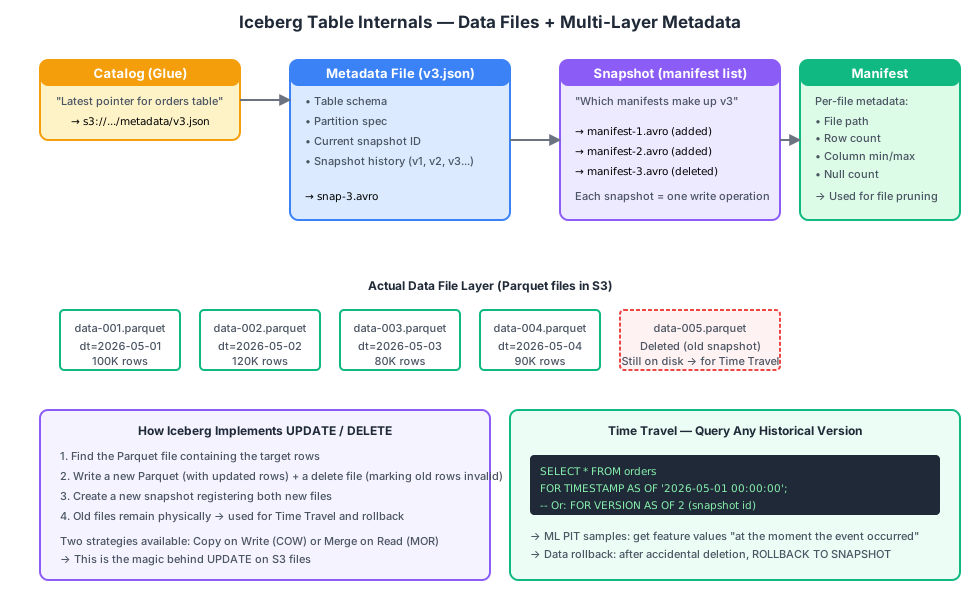
Iceberg’s Layered Metadata Architecture
Iceberg’s key design: on top of data files, it adds a Catalog pointer + three layers of metadata files, each stored as objects on S3.
Catalog (Glue)                       <-- Layer 0: mutable pointer
    |
    +--points to-->  metadata.json (version v3)       <-- Layer 1: table metadata (schema, partition spec, snapshot list)
                |
                +--points to-->  manifest list      <-- Layer 2: which manifests compose the snapshot
                              |
                              +--points to-->  manifest        <-- Layer 3: min/max + path for each data file
                                          |
                                          +--points to-->  data.parquet (actual data)
Each write operation:
- Writes new Parquet data files
- Writes a new manifest registering those files
- Writes a new snapshot referencing the batch of manifests
- Writes a new
metadata.jsonpointing the current snapshot to the new version - Updates the Catalog (Glue) pointer to the new
metadata.json
The entire process is atomic (the final step is a single KV write) — this is how Iceberg achieves ACID guarantees.
How UPDATE / DELETE Works
Iceberg provides two strategies:
Copy on Write (COW) — the default strategy:
- Updating one row means reading the entire Parquet file containing that row, modifying it, writing a new file, and marking the old file as obsolete
- Slow writes, fast reads
Merge on Read (MOR):
- Updating one row means writing a delete file (“this row is deleted”) plus a new data file (containing the updated row)
- Fast writes, reads require merge
- Suitable for high-frequency update scenarios, but requires periodic compaction
Time Travel (A Critical Capability)
Every write generates a snapshot. Files referenced by old snapshots are not immediately deleted (retention period is configurable, default 5 days).
-- Query the table at a specific point in time
SELECT * FROM ads_user_features
FOR TIMESTAMP AS OF '2026-05-01 00:00:00';

-- Query a specific snapshot version
SELECT * FROM ads_user_features
FOR VERSION AS OF 2934856;

-- Roll back after an accidental delete
ALTER TABLE ads_user_features
EXECUTE rollback_to_snapshot(2934856);
Why Recommendation Systems Require Iceberg: Point-in-Time Correctness
Point-in-Time (PIT) correctness is the most common pitfall in recommendation system feature engineering.
The problem: Training samples must use feature values as they existed at the moment the event occurred, not the latest values.
Example:
- User A clicked a video on May 1 (a positive sample)
- On May 1, User A’s interest tag was “Food”
- On May 5, User A’s interest tag was updated to “Travel” (by online learning)
- On May 6, you train the model and fetch User A’s tag from
ads_user_features— you get “Travel” - Training the “clicked a food video” sample with “Travel” as a feature is a feature leakage — the model learns incorrect patterns
Common Misconceptions About Iceberg Time Travel
Many articles suggest:
-- This syntax is NOT valid (Athena/Spark/Trino all reject it)
SELECT ...
FROM ads_user_features FOR TIMESTAMP AS OF s.event_ts
JOIN ads_sample s ON ...Reality: In the Iceberg / SQL:2011 specification, FOR TIMESTAMP AS OF only accepts literal constants or bind parameters — not column references. Iceberg Time Travel cannot perform row-level PIT joins — it’s designed for “rewind the entire table to a single point in time.”
Three Correct PIT Implementations
Approach A: Daily Feature Snapshot Partitions (Recommended, Most Common)
Design ads_user_features as a daily-partitioned table with a full snapshot each day:
-- Training sample table contains (user_id, item_id, event_ts, event_dt, label)
SELECT s.label, u.tag, u.age
FROM   ads_sample_follow s
JOIN   ads_user_features_daily u
       ON u.user_id = s.user_id
       AND u.dt    = s.event_dt;   -- align with the day the event occurred
Keep N days of daily partitions (use Iceberg’s expire_snapshots + partition retention to control costs).
Approach B: Slowly Changing Dimension Type 2 (Accurate to the Second)
-- ads_user_features_history(user_id, tag, age, valid_from, valid_to)
-- Each feature change inserts a new row
SELECT s.label, u.tag
FROM   ads_sample_follow s
JOIN   ads_user_features_history u
       ON s.user_id = u.user_id
       AND s.event_ts >= u.valid_from
       AND s.event_ts <  u.valid_to;
Approach C: SageMaker Feature Store
Feature Store provides a built-in PIT retrieval API (get_record(record_id, event_time)). Under the hood, it uses Iceberg + event-time indexing — AWS handles the complexity of approaches A/B for you.
What Iceberg Time Travel Actually Excels At
Although it cannot do row-level PIT joins, Time Travel is extremely useful for:
- Data rollback:
rollback_to_snapshotafter accidental UPDATEs or DELETEs - Table-level auditing: Compare “the table at midnight yesterday” vs “the table at midnight today”
- Reproducible training: Pin a snapshot; six months later you can still produce the exact same training dataset
SELECT * FROM ads_user_features
FOR TIMESTAMP AS OF TIMESTAMP '2026-05-01 00:00:00';   -- literal constant

SELECT * FROM ads_user_features
FOR VERSION AS OF 2934856;                              -- snapshot id
Schema Evolution
Adding columns, renaming columns, reordering columns — Iceberg handles all of these without rewriting existing data:
ALTER TABLE events ADD COLUMN device_id STRING;             -- add column
ALTER TABLE events RENAME COLUMN ip TO client_ip;            -- rename
ALTER TABLE events ALTER COLUMN amount TYPE DECIMAL(20,4);   -- widen type (compatible direction)
Old Parquet files remain untouched. The new column reads as NULL from old files, and the renamed column continues to work. This was impossible in the Hive-table era.
Practical Usage
-- Create an Iceberg table in Athena
CREATE TABLE poc_social_layla.ods_event (
  event_id   STRING,
  user_id    BIGINT,
  event_type STRING,
  event_ts   TIMESTAMP,
  payload    STRING,
  dt         STRING
)
PARTITIONED BY (dt)
LOCATION 's3://my-bucket/warehouse/ods/event/'
TBLPROPERTIES (
  'table_type' = 'ICEBERG',
  'format'     = 'parquet',
  'write_compression' = 'snappy'
);

-- UPDATE / DELETE / MERGE just like a traditional database
UPDATE ods_event SET event_type = 'view' WHERE event_type = 'expo';

DELETE FROM ods_event WHERE user_id = 99 AND dt = '2026-05-10';

MERGE INTO ods_event t
USING staging_event s ON t.event_id = s.event_id
WHEN MATCHED THEN UPDATE SET payload = s.payload
WHEN NOT MATCHED THEN INSERT VALUES (s.*);
Physical Directory Layout: A Production Architecture
s3://my-bucket/warehouse/
+-- ods/
|   +-- ods_user/        <-- mirror of MySQL users table (CDC)
|   +-- ods_event/       <-- raw event stream (Firehose landing)
|   +-- ods_post/        <-- MySQL posts table
+-- dwd/
|   +-- dwd_user_action/ <-- events joined with user/IP dimensions
|   +-- dwd_post/        <-- enriched post details
+-- dws/
|   +-- dws_user_daily/  <-- daily aggregated user metrics
+-- ads/
|   +-- ads_user_features/    <-- recommendation feature wide table
|   +-- ads_sample_follow/    <-- follow-event training samples
|   +-- ads_recall_u2u_cf/    <-- collaborative filtering recall pool
+-- athena-results/      <-- Athena query result staging
Every directory contains an Iceberg table. Each table’s metadata files are registered in the Glue Data Catalog.
Chapter Summary
| Concept | One-Liner |
|---|---|
| S3 | The physical foundation of the data lake — virtually unlimited capacity, pay-per-GB, 11 nines durability |
| Row store vs Column store | OLAP demands columnar: 80%+ I/O savings, superior compression |
| Parquet | The standard file format for AWS data lakes |
| Predicate pushdown | Parquet column statistics let engines skip entire files — critical for performance |
| Iceberg | A “table format” layer on top of S3 files that adds ACID, UPDATE/DELETE, and Time Travel |
| PIT correctness | Recommendation systems must use daily snapshot partitions or SCD Type 2 to avoid feature leakage |
Next up: how data moves from source systems into S3.