Big Data on AWS Deep Dive (Part 4): Glue Catalog, Athena, and Lake Formation
How AWS Glue Data Catalog acts as the central directory for your data lake, and how Athena queries Parquet and Iceberg tables on S3 with serverless SQL.
Data has landed in S3 — how do Athena, Spark, and SageMaker know “this is a table with these columns”? Answer: Glue Data Catalog.
Once tables are registered, who executes the SQL? Answer: Athena (serverless) / EMR Spark (heavy workloads) / Redshift (high-concurrency BI).
Who controls “which fields can which people see”? Answer: Lake Formation.
Why You Need a Central Metadata Directory
What happens without a Catalog? Here is a common disaster scenario:
Team A: Creates an `events` table in Athena, partitioned by dt
Team B: Uses EMR Spark with their own schema to read events, discovers a column type mismatch
Team C: Uses SageMaker for training, CSV mode + hardcoded column names
Three teams, three schemas, nobody knows which one is correct — data governance collapses.
Glue Data Catalog is the single source of truth: every engine reads table definitions from the same place — one metadata store to rule them all.
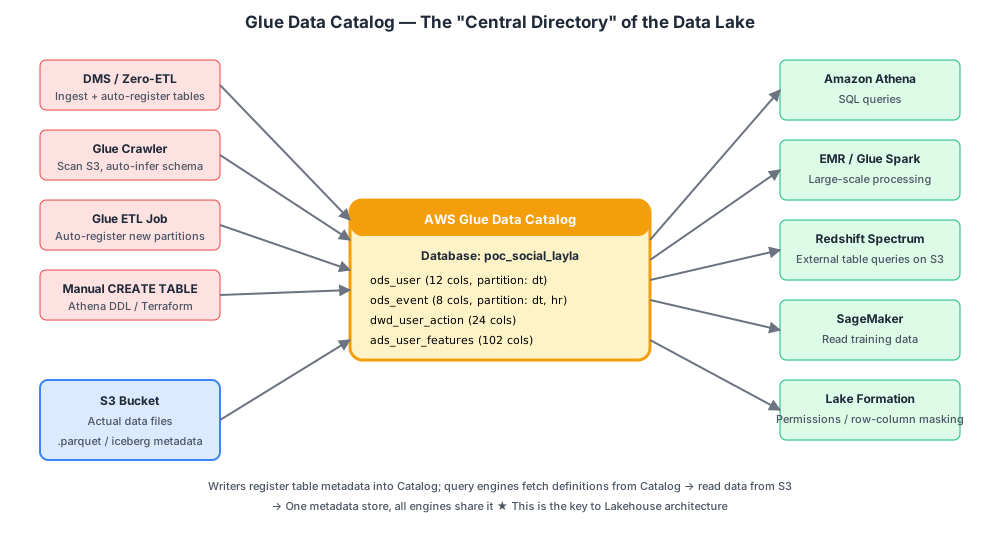
AWS Glue Data Catalog Explained
What It Is — and What It Is Not
It is: a service that stores only metadata (a Metastore). It is not: a database (it stores no business data); it is not a query engine (it does not run SQL).
Analogy: a library’s card catalog — it tells you “the book To Live is on floor 3, section B, row 5, position 12.” The book itself is on floor 3.
Three-Level Hierarchy
Glue Data Catalog                ← One per AWS account (global)
└── Database                     ← Namespace (analogous to a "schema")
    └── Table                    ← A single table
        ├── Schema (column names, types)
        ├── Location (s3://...)  ← Where the data lives in S3
        ├── Partitions (dt=...)  ← Partition definitions
        ├── Storage format (Parquet / Iceberg / CSV)
        └── Other properties
Four Ways Data Enters the Catalog
| Method | Best For | Automation Level |
|---|---|---|
| Zero-ETL / DMS-based Zero-ETL | Aurora / RDS MySQL CDC | Fully automatic |
| Glue Crawler | Existing S3 data; auto-infers schema and registers | High |
| Glue ETL Job (registers on write) | Spark writes new partitions and auto-registers | Medium |
| Manual CREATE TABLE / Terraform | Fully controlled production environments | Low — but most stable |
Production best practice: Use manual / Terraform to define ODS / DWD / DWS / ADS table schemas (controlled). Use Crawlers only for exploratory data.
What Is a Glue Crawler?
A Crawler is a “scan S3 and auto-create tables” tool:
- You give it an S3 path
- It scans a few files, infers column types and partitions
- It auto-registers the table in the Catalog
Pros: Convenient. Cons: Inferred types can be wrong (e.g., a string inferred as int), partition detection can be unstable. In production, always review Crawler output.
Iceberg Tables Are Special
An Iceberg table does not register Parquet file paths in the Catalog. Instead, it registers a pointer to an Iceberg metadata.json file:
Catalog entry for ods_user table:
  TBLPROPERTIES:
    table_type = 'ICEBERG'
    metadata_location = 's3://.../ods_user/metadata/v123.json'
On every write: Iceberg writes a new metadata.json, then the Catalog atomically updates the metadata_location pointer to the new version.
Key insight: Every engine reading an Iceberg table first fetches the current metadata pointer from the Catalog, then parses the metadata to get a precise file manifest. This is how ACID transactions are implemented in a data lake.
Cross-Account and Cross-Region
- Same account, same Region: shared directly
- Cross-account: grant access via Lake Formation Resource Sharing
- Cross-Region: use Glue Cross-Region Catalog (available 2024+)
Pricing
Very affordable:
- First 1 million objects (tables + partitions): free
- After that: $1 per million objects per month
- API requests: first 1 million per month free, then $1 per million
In practice, this cost is negligible for any real data warehouse.
Official docs:
Amazon Athena: Serverless SQL Queries
What Is Athena?
One sentence: Give it a table registered in Glue Catalog plus a SQL query, and it runs the query and returns results. Serverless, pay-per-scan.
The underlying engine is Trino (formerly Presto, originally open-sourced by Facebook as a distributed SQL engine), managed and optimized by AWS.
How a Query Executes Internally
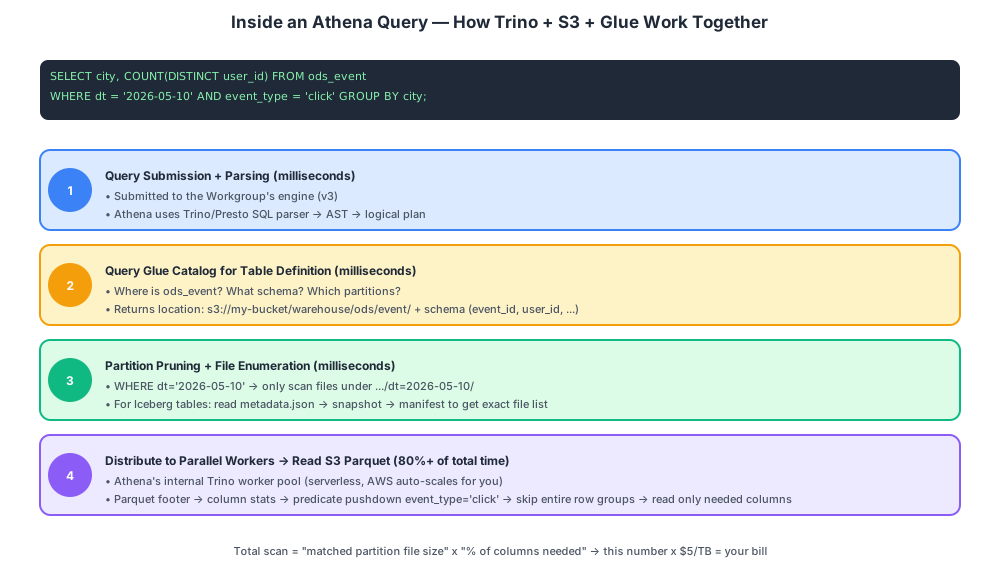
Four steps:
- Parse SQL — produce a logical plan
- Query Glue Catalog — fetch table definition, partition list, file locations
- Partition pruning + predicate pushdown — determine exactly which files and columns need to be read
- Parallel Trino workers read S3 — aggregate results — write output to S3 — return
The entire process is transparent to you: you submit SQL and get results back. AWS hides the Trino cluster completely behind the scenes.
Pricing Model
Charged by bytes scanned (approximately $5/TB in us-east-1). Understanding this is key to controlling costs.
“Bytes scanned” means the Parquet data read from S3, not the size of the result set:
-- Assume ods_event is 1 TB total
SELECT COUNT(*) FROM ods_event;                          -- scans 1 TB → $5
SELECT COUNT(*) FROM ods_event WHERE dt='2026-05-10';    -- scans 30 GB (one day) → $0.15
SELECT user_id  FROM ods_event WHERE dt='2026-05-10';    -- scans 3 GB (one day + one column) → $0.015
The first two orders of magnitude in savings come from data layout — this is precisely why Parquet + partitioning + Iceberg is a mandatory combination.
Performance Optimization Tips (Ordered by Impact)
| # | Technique | Savings |
|---|---|---|
| 1 | CSV/JSON to Parquet | 70-90% |
| 2 | Partition by dt + use WHERE dt=’…‘ | 90%+ |
| 3 | Predicate pushdown (leverages Parquet column stats / Iceberg) | 50-90% |
| 4 | Right-size files (128-512 MB) | Reduces metadata overhead by ~30% |
| 5 | Use Iceberg instead of Hive tables | More precise file-level skipping |
| 6 | LIMIT + column pruning (SELECT col1, col2 instead of SELECT *) | 50-90% |
| 7 | Set max scan limits in Workgroup | Prevents runaway queries |
Workgroups
A Workgroup is Athena’s internal “configuration container” that bundles the following:
| Setting | Purpose |
|---|---|
| Engine version | v2 / v3 (v3 required for full Iceberg support + better performance) |
| Result location | Which S3 bucket receives query results |
| Encryption | Encryption config for results |
| Cost limits | Max scan per query / max scan per Workgroup |
| Data usage controls | Threshold alerts |
| Tags | For cost allocation |
Production best practice: One Workgroup per team or business unit, enabling:
- Bill splitting (CloudWatch reports per Workgroup)
- Cost governance (cap limits to prevent expensive runaway queries)
- Engine isolation (some teams still on v2 without affecting others)
Provisioned Capacity (2023+)
Normal Athena is serverless, but sometimes the business demands strict SLAs (e.g., a BI dashboard that must return within 5 seconds — on-demand mode can occasionally be queued).
Athena Provisioned Capacity: Pre-purchase dedicated compute units (DPUs) for guaranteed stable latency.
- Minimum 24 DPUs (approximately $20/hour), billed hourly
- Suitable for SLA-critical workloads; regular analytics does not need this
Athena Can Write Too: CTAS and INSERT INTO
Athena is not read-only — it can also write data:
-- CREATE TABLE AS SELECT
CREATE TABLE dwd_user_action
WITH (
  format = 'PARQUET',
  partitioned_by = ARRAY['dt'],
  location = 's3://my-bucket/warehouse/dwd/user_action/'
) AS
SELECT * FROM ods_event WHERE event_type = 'click';

-- Insert into a new partition
INSERT INTO dwd_user_action
SELECT * FROM ods_event WHERE dt = '2026-05-10';

-- Iceberg table UPDATE / DELETE / MERGE (v3 supports this)
MERGE INTO dwd_user_action t USING staging s
ON t.event_id = s.event_id ...
This is why lightweight ODS / DWD / DWS / ADS layer transformations are best handled by Athena CTAS (cheapest option), while heavy processing goes to EMR / Glue Spark.
Official docs:
Athena vs. Other Query Engines
Athena vs. Redshift
| Athena | Redshift | |
|---|---|---|
| Architecture | Serverless, storage-compute separation (data in S3) | Traditional MPP, storage-compute coupled |
| Data location | S3 (yours) | Redshift’s own dedicated storage |
| Pricing | Per bytes scanned | Per node / per hour |
| Concurrency | Default 25 (adjustable) | 50+ (with Concurrency Scaling) |
| Performance | Medium (4-30 seconds typical) | High (sub-second to few seconds) |
| Best for | Data lake ad-hoc queries / ETL / ML data extraction | BI dashboards with high concurrency |
How to choose: Our architecture follows the data lake route, using Athena as the primary engine. If you also need high-concurrency BI (e.g., 100 analysts simultaneously refreshing dashboards), you can layer Redshift Spectrum on top (Redshift’s engine querying S3 external tables) for a “hot data in Redshift, cold data in S3” strategy.
Athena vs. EMR Spark
| Athena | EMR Spark | |
|---|---|---|
| Programming | SQL only | SQL + Python + Scala + UDF |
| Complexity | Low | Medium to high |
| Best for | Simple transforms / aggregations / anything SQL can express | Heavy ETL / ML / complex logic |
| Performance | Trino is fast on small-to-medium datasets | Spark is more stable on TB+ datasets |
In practice: Athena CTAS handles simple SQL jobs; EMR Serverless handles complex Spark jobs; both share the same Glue Catalog.
Lake Formation: Data Governance and Fine-Grained Permissions
Why You Need It
The Catalog solves “what is this table,” but “who can see which columns and which rows” requires a dedicated permission layer.
Examples:
- The ML team needs access to
ads_user_featuresbut must not see the phone or id_card columns - BI analysts can only see data from their own region
- Auditors can read all data but cannot modify anything
Traditional data warehouses (Redshift) have their own permission systems. But in a data lake where data is scattered across S3, how do you manage access? The answer is Lake Formation.
What Is Lake Formation?
Lake Formation is AWS’s fine-grained permission management layer on top of Glue Catalog:
- Row-Level Security
- Column-Level Security
- Data masking / Tag-based Access Control (TBAC)
- Cross-account data sharing
How It Works
Traditional model (IAM only):
  IAM Role → S3 bucket policy → Can this role read s3://bucket/path?

Lake Formation model:
  IAM Role
    → Glue Catalog (Table concept)
      → Lake Formation checks: Does this Role have SELECT on specific columns of ods_user?
        → Deny certain columns / rows / deny entirely
Example: Column-Level Permissions
Lake Formation column-level grants are not standard ANSI SQL — they are configured through three approaches:
Approach 1: LF Console / API (recommended for production)
In the Lake Formation console: Data permissions, Grant. Select the IAM Role + table + check visible columns (include columns) or exclude sensitive columns (exclude columns). Equivalent CLI:
aws lakeformation grant-permissions \
  --principal DataLakePrincipalIdentifier=arn:aws:iam::123:role/data-science-role \
  --permissions SELECT \
  --resource '{
    "TableWithColumns": {
      "DatabaseName": "poc_social_layla",
      "Name": "ads_user_features",
      "ColumnNames": ["user_id","age","city","tags"]
    }
  }'
Approach 2: Athena LF-style GRANT (engine v3 + table managed by LF)
GRANT SELECT (user_id, age, city, tags)
ON poc_social_layla.ads_user_features
TO PRINCIPAL 'arn:aws:iam::123:role/data-science-role';
Note TO PRINCIPAL '<full ARN>' — this is not the PostgreSQL/Redshift-style TO ROLE 'name'.
Effect:
SELECT * FROM ads_user_features;                    -- Denied (includes phone/id_card)
SELECT user_id, age, tags FROM ads_user_features;   -- OK
Approach 3: LF Tag-based Access Control (LF-TBAC): Tag tables/columns (e.g., pii=true), then grant permissions by tag. More scalable for large organizations.
Common Pitfalls
Lake Formation configuration is complex. Common pain points:
- Permissions stack on top of IAM — debugging requires checking two layers
- Tables auto-created by Glue Crawler may not inherit LF permissions
- Cross-account sharing requires Resource Links to work
Practical advice: During POC phases, skip Lake Formation (use coarse-grained IAM). Enable it when moving to production.
Official docs: Lake Formation
The Full Metadata + Query Picture
┌─────────────────────────────────────────────────────┐
│              S3 Physical Data Layer                  │
│   warehouse/ods/event/dt=2026-05-10/*.parquet       │
└──────────────────────┬──────────────────────────────┘
                       ▲
                       │ File-level access
                       │
┌──────────────────────┴──────────────────────────────┐
│            Glue Data Catalog (Metadata)              │
│   poc_social_layla.ods_event                        │
│     schema, partitions, location → s3://...         │
└──────────────────────┬──────────────────────────────┘
                       ▲
                       │ Fetch table definitions
                       │
┌──────────────────────┴──────────────────────────────┐
│       Lake Formation (Permission Layer, optional)    │
│   Per IAM Role: which columns / rows are visible    │
└──────────────────────┬──────────────────────────────┘
                       ▲
        ┌──────────────┼─────────────┬─────────────┐
        │              │             │             │
   Athena (SQL)    EMR Spark    SageMaker    Redshift Spectrum
Chapter Summary
| Concept | One-Line Summary |
|---|---|
| Glue Data Catalog | The data lake’s central table metadata store, shared by all engines |
| Glue Crawler | Scans S3 and auto-creates tables (use cautiously in production) |
| Iceberg + Catalog | Catalog stores a pointer to Iceberg’s metadata.json |
| Athena | Serverless SQL engine, powered by Trino, charged per bytes scanned |
| Workgroup | Athena’s configuration container for cost governance and team isolation |
| Lake Formation | Column-level / row-level permission management — fine-grained access on top of IAM |