Claude Code vs Cursor vs Amazon Q: One Year Honest Review
After a year of daily AI-assisted coding — what actually works, what doesn't, and which tool wins for what.
中文版 / Chinese Version: 本文最初发表于 CSDN。阅读中文原文 →
Google I/O had barely wrapped up when Anthropic dropped Claude 4 — Opus 4 and Sonnet 4 — in May 2025. The timing was not accidental. With the subsequent releases of Claude 4.5 (Haiku 4.5) and Claude 4.6 (Opus 4.6, Sonnet 4.6), Anthropic has methodically positioned itself as the default model provider for AI-assisted coding. Not just through benchmarks, but through the tools developers actually use every day.
I have been using AI coding tools daily for over a year now — starting with GitHub Copilot, progressing through Cline, Roo Code, Cursor, Amazon Q Developer CLI, and Claude Code. This article is not a hype piece about how AI will replace programmers, nor a defensive screed about why it won’t. It is a practitioner’s assessment of what these tools can and cannot do, based on hundreds of hours of real-world use across multiple languages and project types.
The AI Coding Landscape in 2025
AI-assisted coding has become the second-largest consumer of LLM tokens, behind only conversational chatbots. Some analysts argue it is already the largest single-use-case market. Every major model provider is racing to optimize for code generation, and the tooling ecosystem has fragmented into three distinct paradigms.
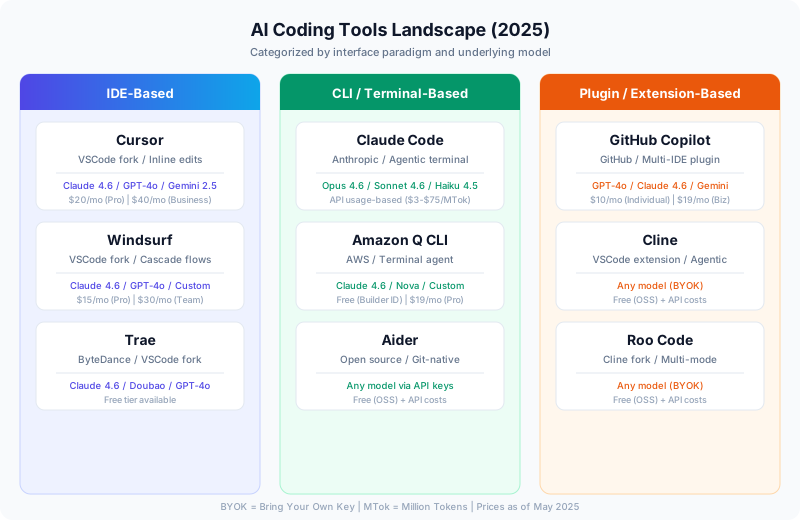
The landscape breaks down into three categories:
- IDE-based tools (Cursor, Windsurf, Trae) — Fork an editor, bake AI in at the OS level. Deepest integration, but you surrender your editor choice.
- CLI/Terminal tools (Claude Code, Amazon Q CLI, Aider) — Live in the terminal alongside your existing workflow. Maximum flexibility, steeper learning curve.
- Plugin/Extension tools (Copilot, Cline, Roo Code) — Bolt onto your existing IDE. Lowest friction, but constrained by extension APIs.
One striking pattern: nearly every tool in every category either defaults to or strongly recommends Claude models as the backend. This is not a coincidence — Claude’s performance on code generation tasks, particularly multi-file edits and long-context reasoning, has been consistently ahead of the competition since Claude 3.5 Sonnet.
Head-to-Head: The Tools I Actually Use
After a year of daily use, here is my honest assessment of each tool, including the things their marketing pages will never tell you.
Comparison Table
| Criteria | Claude Code | Cursor | Cline | Amazon Q CLI | GitHub Copilot |
|---|---|---|---|---|---|
| Interface | Terminal (agentic) | IDE (inline + chat) | VSCode extension (agentic) | Terminal (agentic) | Multi-IDE plugin |
| Default Model | Opus 4.6 / Sonnet 4.6 | Multi-model | BYOK (Claude recommended) | Claude / Nova | GPT-4o / Claude |
| Context Window | 200K tokens | ~120K effective | Model-dependent | ~128K effective | ~128K effective |
| Edit Mode | Diff-based patches | Inline (surgical) | Full-file rewrite | Diff-based patches | Inline completions |
| Token Efficiency | High (diff only) | Very high (inline) | Low (full rewrites) | High (diff only) | Medium (completions) |
| Monthly Cost | API usage (~$50-200) | $20-40/mo | API usage (~$30-150) | Free-$19/mo | $10-19/mo |
| Agentic Capability | Excellent | Good | Excellent | Excellent | Limited |
| Best For | Complex multi-file tasks | Daily coding workflow | Power users with budgets | AWS-centric teams | Quick completions |
Cursor: The Most Polished Experience
Cursor is the most popular AI coding IDE for a reason. Its inline edit mode is genuinely efficient — when you change a single line, it modifies that line. It does not regenerate the entire file. This sounds trivial, but it represents a fundamental architectural choice that directly impacts both token consumption and accuracy.
Where Cursor excels:
- Inline diffs that respect surrounding code structure
- Tab completion that feels predictive rather than intrusive
- Multi-file awareness through its codebase indexing
- Reasonable price point for the capability ($20/month for Pro)
Where Cursor falls short:
- Context window can be limiting on large codebases — it aggressively truncates to stay within token budgets, sometimes losing critical context
- The “Agent” mode (Composer) is less reliable than dedicated agentic tools for complex multi-step tasks
- You are locked into a VSCode fork — if you prefer JetBrains or Neovim, this is a dealbreaker
- At 500 “fast” requests per month on Pro, heavy users will burn through the quota in two weeks
From a business perspective, the math is compelling: if Cursor improves a developer’s productivity by even 30%, the $20/month cost is trivial compared to the salary savings. Every engineering manager I know has done this calculation.
Claude Code: The Power User’s Choice
Claude Code is Anthropic’s terminal-based coding agent. It is not an IDE — it lives in your terminal and operates on your codebase through file reads, writes, and shell commands. This architectural choice gives it maximum flexibility but requires a different mental model than IDE-based tools.
Where Claude Code excels:
- Deep agentic workflows: it can read files, write code, run tests, commit to Git, and iterate — all autonomously
- 200K token context window means it can reason about large codebases without losing track
- Diff-based editing preserves token budget while maintaining precision
- No vendor lock-in on the editor side — use it alongside whatever IDE you prefer
- The
/compactcommand and conversation summarization help manage long sessions
Where Claude Code falls short:
- API-based pricing means costs can spiral if you are not careful — a heavy day can easily cost $15-30
- No inline completions — it is a conversational agent, not a tab-completion tool
- Terminal-only interface means you lose the visual feedback of seeing diffs highlighted in an editor
- Requires comfort with CLI workflows; not suitable for developers who live entirely in an IDE
Claude Code is the tool I reach for when the task is complex: refactoring a module that touches 15 files, debugging a distributed system issue, or scaffolding an entirely new service. For simple “complete this function” tasks, it is overkill.
Cline: Power and Profligacy
Cline is an open-source VSCode extension that turns your editor into a full agentic coding environment. It supports any model via API keys (BYOK), and its agentic capabilities rival Claude Code’s.
Where Cline excels:
- Full agentic loop inside VSCode — file creation, terminal commands, browser automation
- BYOK means you can use whatever model you want, including local models
- Excellent diff viewer that shows exactly what the agent wants to change before applying
Where Cline falls short:
- Token efficiency is a serious problem. Even for a one-line change, Cline often regenerates the entire file. On a 500-line file, that is 500 lines of output tokens when it should be 5.
- If the file is long enough, the model may hit output token limits and produce truncated, broken code
- Claude 3.7’s prompt caching mitigates the input cost somewhat, but the output waste remains significant
- Costs can be 3-5x higher than equivalent tasks in Cursor or Claude Code
I used Cline extensively with Claude 3.7 Sonnet for several months. The agentic capabilities are genuinely impressive — it can plan, execute, test, and iterate. But watching it regenerate a 400-line file to change one import statement is physically painful when you are paying per token.
Amazon Q Developer CLI: The Hidden Gem
Amazon Q Developer CLI is the tool most developers have not tried but probably should. It is free with an AWS Builder ID, its agentic capabilities are strong, and it runs Claude models under the hood.
Where Q CLI excels:
- Free tier is genuinely usable for daily development
- Deep AWS integration — it understands CloudFormation, CDK, IAM policies in ways other tools do not
- Diff-based editing similar to Claude Code’s approach
- Context-aware: reads your project structure, understands your stack
Where Q CLI falls short:
- Model selection is opaque — you do not always know which model is handling your request
- Less flexible than Claude Code for non-AWS workflows
- The free tier has request limits that heavy users will hit
- Smaller community means fewer tips, tricks, and shared configurations
For AWS-centric development, Q CLI is hard to beat on value. I use it alongside Claude Code — Q CLI for infrastructure and AWS-specific tasks, Claude Code for application logic and complex refactors.
GitHub Copilot: The Gateway Drug
Copilot was most developers’ first taste of AI-assisted coding. Its inline completions changed how millions of people write code. But in 2025, it feels like the baseline rather than the frontier.
Where Copilot excels:
- Tab completion is still the fastest path from “thinking about code” to “having code”
- Works in virtually every IDE and editor
- Copilot Chat has improved significantly, especially with Claude model access
- Enterprise features (content exclusion, audit logs) are mature
Where Copilot falls short:
- Agentic capabilities lag significantly behind Cline, Claude Code, and Q CLI
- The completion model sometimes suggests code that is plausible but wrong — particularly with less common libraries
- Context window is smaller than dedicated tools, leading to less accurate suggestions on complex codebases
- Copilot Workspace (the agentic product) remains limited compared to alternatives
What AI Coding Tools Are Actually Good At (And What They Are Not)
After a year of daily use across all these tools, here is my honest breakdown of where AI coding genuinely helps and where it consistently fails.
Where AI Excels
Boilerplate and scaffolding. Creating a new API endpoint with request validation, database query, response formatting, error handling, and tests? AI tools handle this in minutes rather than the 30-60 minutes it takes manually. The code is not always production-ready, but it is 80% of the way there.
Language bridging. This is the single most transformative capability. I am primarily a Java and Go developer. Over the past year, AI tools have let me ship production code in Python, TypeScript, and even Rust. I can describe what I want in terms of patterns I know, and the AI translates those patterns into idiomatic code in the target language. This does not make me an expert in those languages — but it makes me productive in them far faster than learning from scratch.
Test generation. Given an existing function, AI tools generate reasonable test cases covering happy paths, edge cases, and error conditions. The tests often need refinement, but they provide a solid starting point that is better than staring at a blank test file.
Code review and explanation. Asking an AI to explain a complex piece of unfamiliar code — or to review your own code for issues — is consistently valuable. The models are good at spotting logical errors, potential null pointer issues, and deviations from common patterns.
Regex, SQL, and configuration. Any task that involves translating human intent into a formal language with fiddly syntax is a sweet spot for AI. Writing complex SQL queries, regex patterns, webpack configs, or Kubernetes manifests is dramatically faster with AI assistance.
Where AI Consistently Struggles
Distributed systems design. Ask an AI to architect a system that handles eventual consistency across three microservices with different failure modes, and you will get something that looks plausible but collapses under scrutiny. The model has no intuition for race conditions, network partitions, or the subtle timing issues that make distributed systems hard.
Performance optimization. AI tools can suggest algorithmic improvements for isolated functions, but they cannot reason about system-level performance. They do not understand your traffic patterns, your database query plans, your cache hit rates, or the memory pressure on your containers. I have spent more time undoing AI-suggested “optimizations” that were slower than the original than I care to admit.
Security. The models know about common vulnerabilities (SQL injection, XSS, CSRF) and will avoid the obvious mistakes. But security in real systems is about threat modeling, trust boundaries, and defense in depth — none of which AI handles well. Never trust AI-generated code with security-critical paths without thorough human review.
Large-scale refactoring with business logic. AI can rename a variable across 50 files. It cannot refactor an order processing pipeline to support a new fulfillment model, because that requires understanding business rules that exist in Slack threads, Jira tickets, and the heads of product managers — not in the code.
SWE-bench: What the Benchmarks Actually Tell Us
Claude 4 models topped SWE-bench Verified when they launched, and subsequent Claude 4.5/4.6 releases have maintained that lead. But what does this benchmark actually measure, and what should practitioners take away from it?
SWE-bench presents real GitHub issues from popular Python repositories and measures whether an AI can produce a patch that resolves the issue and passes the test suite. This is meaningfully harder than toy benchmarks — it requires understanding codebases, reading issue descriptions, and producing working diffs.
What SWE-bench tells you:
- How well a model handles the specific task of “read an issue description, understand a codebase, produce a working patch”
- Relative ranking between models on this task type
- That Claude models are genuinely strong at code understanding and generation
What SWE-bench does not tell you:
- How the model performs on your specific tech stack (SWE-bench is Python-heavy)
- Whether the model can handle multi-step tasks, iterative debugging, or architectural decisions
- How the model performs with different tooling wrappers (the agent framework matters as much as the model)
- Cost efficiency — a model that solves 60% of issues at $0.50/task may be more practical than one that solves 65% at $5.00/task
My practical experience aligns with the benchmarks directionally — Claude models consistently produce better code than alternatives — but the magnitude of improvement in real-world use is smaller than the benchmark gap suggests. The tooling wrapper, prompt engineering, and context management often matter more than the raw model capability.
The Programmer Evolution Thesis
The original Chinese version of this article posed the question that dominates every AI discussion: “Will AI replace programmers?” After a year of intensive use, I think this question is wrong. The right question is: “How is AI changing what it means to be a programmer?”
The Skill Atrophy Problem
Here is an uncomfortable truth I have noticed in myself: my raw coding ability has degraded. After a year of AI-assisted development, I am measurably slower when writing code without AI tools. Muscle memory for syntax, standard library APIs, and common patterns has weakened because I have been outsourcing that work to models.
This is not a hypothetical concern. I have caught myself:
- Unable to remember the exact signature of Go’s
http.HandleFuncwithout AI completion - Writing Python list comprehensions incorrectly when coding on a machine without AI tools
- Struggling to debug issues that would have been immediately obvious a year ago, because I had grown accustomed to asking the AI to explain error messages
This is the same pattern we saw with GPS navigation — most people today cannot navigate without Google Maps in cities they have lived in for years. The convenience is real, but the dependency is also real.
The Two-Track Future
I see the developer profession splitting into two tracks, and this split is already happening:
Track 1: Systems Architects and AI Orchestrators. These are senior developers who understand distributed systems, performance engineering, security, and infrastructure. They use AI to execute faster, but their value lies in making decisions that AI cannot: system design, trade-off analysis, technology selection, failure mode reasoning. This track requires more depth, not less. The developers who thrive here are the ones who can look at AI-generated code and immediately spot the subtle bug that will cause a production outage at 3 AM.
Concrete example: I recently used Claude Code to scaffold an entire ECS Fargate service with RDS, ElastiCache, and ALB. The AI generated 90% of the CDK code correctly. But it configured the database connection pool with default settings that would have exhausted connections under production load, set security group rules that were too permissive, and used a NAT Gateway configuration that would have cost $300/month more than necessary. Catching those issues required understanding that no benchmark measures.
Track 2: Natural Language Developers. These are domain experts — data analysts, product managers, designers, scientists — who use AI to build tools without traditional programming skills. They describe what they want in natural language, and AI assembles it. This track does not require deep technical knowledge, but it does require clear thinking and the ability to evaluate whether the output actually does what you need.
Both tracks are legitimate. The mistake is thinking they are the same job.
Practical Workflow Tips
After a year of experimentation, here is the workflow I have converged on:
1. Use the right tool for the right task.
- Quick completions while writing: Copilot (tab completion is unbeatable for flow state)
- Complex multi-file refactors: Claude Code (200K context + agentic loop)
- AWS infrastructure: Amazon Q CLI (free + deep AWS knowledge)
- Exploratory coding in VSCode: Cursor (inline edits are fast and accurate)
2. Always review diffs, never trust blindly. Every tool produces plausible-looking code that is subtly wrong some percentage of the time. Treat AI output like code from a talented but careless junior developer — good instincts, questionable attention to detail.
3. Provide context aggressively. The single biggest lever for AI coding quality is context. Point the tool at your style guide, your existing patterns, your test examples. The more context the model has, the better its output aligns with your codebase.
4. Use AI for the first draft, humans for the final draft. AI generates 80% of the code in 20% of the time. The remaining 20% — error handling edge cases, performance tuning, security hardening — still requires human expertise. Plan your workflow accordingly.
5. Track your costs. API-based tools (Claude Code, Cline) can produce surprising bills. Set up budget alerts, use prompt caching where available, and be intentional about when you reach for the expensive agentic tools versus cheaper completions.
Where We Are Headed
The AI coding tools of mid-2025 are roughly at an L2-L3 level on the autonomous driving analogy that industry analysts like to use. The AI handles well-defined tasks reliably but requires human supervision for anything novel, complex, or safety-critical. Full autonomy (L5) is not on any realistic near-term roadmap.
What I expect over the next 12 months:
- Context windows will keep growing. Gemini already offers 1M+ tokens; Claude and GPT will follow. This directly improves multi-file reasoning.
- Tool integration will deepen. Expect AI coding tools to understand your CI/CD pipeline, your monitoring dashboards, and your deployment topology — not just your source code.
- Costs will drop. Competition and hardware improvements will make today’s premium capabilities tomorrow’s commodity. Sonnet 4.6 is already roughly 5x cheaper per token than Sonnet 3.5 was at launch.
- The agentic paradigm wins. Simple completions are becoming table stakes. The differentiation is in tools that can plan, execute, test, and iterate autonomously.
The developers who will thrive are not the ones who resist these tools, nor the ones who blindly delegate to them. They are the ones who understand the tools deeply enough to use them as force multipliers — amplifying human judgment rather than replacing it.
That understanding starts with using the tools daily, pushing them to their limits, and maintaining an honest assessment of what they can and cannot do. After a year of exactly that, I am more productive than I have ever been — and more aware than ever of the skills that no model can replace.
References
- Introducing Claude 4 — Anthropic
- Claude Code repository — GitHub
- Anthropic engineering blog — Anthropic