How to Design a Full-Site Search Engine with Elasticsearch
Multi-source indexing, CDC sync, permission-aware search, hot keywords, and typeahead — a complete Elasticsearch architecture guide.
中文版 / Chinese Version: 本文最初发表于 CSDN。阅读中文原文 →
Building a full-site search engine sounds like a well-trodden path — until you face the real-world constraints: multiple data sources (relational databases and third-party APIs), documents in various formats (HTML, PDF, Word, Excel, PowerPoint), fine-grained permission filtering, hot keyword ranking with time decay, and typeahead suggestions. This article walks through a production design that addresses all of these concerns using Elasticsearch 8.x as the core search engine.
Requirements Overview
The search engine must support four core features:
- Keyword search — full-text search across titles and body content, with hit highlighting, configurable source-priority weighting, relevance and time-based sorting, and per-user permission filtering.
- Multi-source mixed ranking — results from our own Elasticsearch index must be merged with results from third-party APIs, sorted by a unified relevance score, with correct pagination across both sources.
- Hot keyword ranking — a daily-updated leaderboard of trending search terms with a time-decay formula so that stale terms naturally fade.
- Typeahead suggestions — as-you-type completion powered by the Elasticsearch Completion Suggester.
Architecture
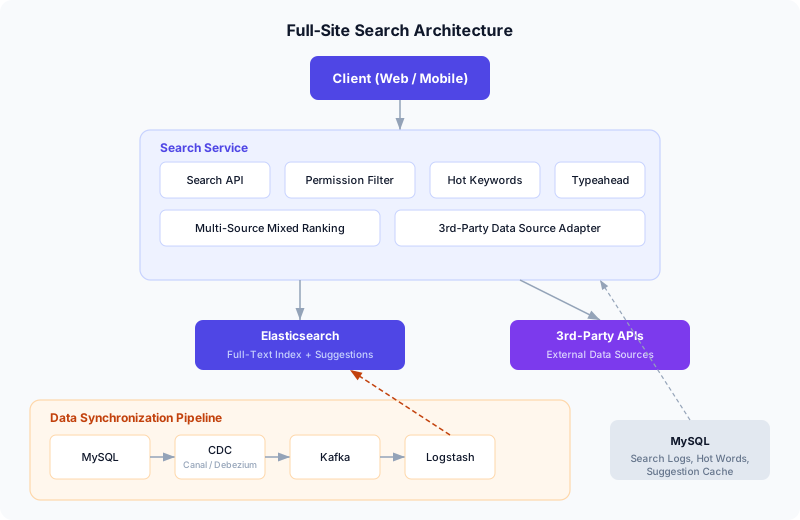
The system is divided into two major layers:
Search Service handles all query-time logic: the Search API that clients call, permission-aware filtering, hot keyword retrieval, typeahead suggestions, and the mixed-ranking engine that merges results from Elasticsearch and external APIs.
Data Synchronization Pipeline keeps Elasticsearch in near-real-time sync with the authoritative MySQL database using CDC (Change Data Capture) via binlog parsing. A schema transformer converts raw change events into the Elasticsearch document format before indexing.
Search behavior logs (query terms, timestamps, user IDs) are written to MySQL and used by a daily batch job to compute hot keywords and suggestion candidates.
Technology Choices
3.1 Search Engine: Elasticsearch 8.x
Elasticsearch remains the most mature, actively maintained open-source full-text search engine. For cloud deployments, Amazon OpenSearch Service provides a managed alternative that is API-compatible with Elasticsearch and removes the operational burden of cluster management.
Key configuration notes:
- Enable the IK Analysis plugin for CJK (Chinese/Japanese/Korean) tokenization. If you need fine-grained Chinese segmentation, use
ik_max_wordat index time andik_smartat search time. - Budget heap memory carefully. Heavy analyzer plugins can cause OOM on small instances — plan for at least 8 GB of JVM heap in production.
3.2 Document Extraction
Documents stored as binary files (PDF, Word, Excel, PowerPoint) need to be converted to plain text for indexing. The main options:
| Tool | Approach | Trade-off |
|---|---|---|
| Apache Tika | Java library, widest format support | Needs JVM; complex layouts may lose fidelity |
| Ingest Attachment | ES plugin wrapping Tika | Tightly integrated, but runs inside ES nodes |
| FsCrawler | Standalone file-system crawler | Good for batch; not suitable for streaming |
| Cloud APIs | AWS Textract, Azure AI Document Intelligence | Pay-per-page; best accuracy for scanned docs |
For a streaming architecture, the recommended approach is to call a document-extraction service (Tika or a cloud API) inside the schema transformer before writing to Elasticsearch. This keeps the extraction logic decoupled from both the application and ES itself.
3.3 Data Synchronization: Binlog-Based CDC
There are four common patterns for syncing MySQL data to Elasticsearch:
| Pattern | Pros | Cons |
|---|---|---|
| Synchronous dual-write | Lowest latency | Tight coupling; partial-failure risk |
| Async dual-write (via MQ) | Decoupled writes | Application must publish events |
| Periodic batch ETL | Zero app changes | High latency; polling load on MySQL |
| Binlog CDC | Near-real-time; zero app changes; consistent | Requires CDC tooling |
Binlog CDC is the recommended approach because it is transparent to the application, provides near-real-time latency, and guarantees that every committed change is captured exactly once.
CDC Tool Selection
The two most widely-used open-source CDC connectors are:
- Canal (Alibaba) — a mature Java-based tool that masquerades as a MySQL replica to receive binlog events. It has a large user base in the Chinese tech ecosystem and supports Kafka, RocketMQ, and custom downstream adapters.
- Debezium (Red Hat) — a Kafka Connect-based CDC platform that supports MySQL, PostgreSQL, MongoDB, and many other databases. It provides a richer event format (before/after snapshots), built-in schema evolution handling, and is the standard choice in Kafka-centric architectures.
For AWS-native deployments, AWS Database Migration Service (DMS) can stream CDC events from RDS MySQL to Amazon MSK (Kafka), Amazon OpenSearch, or S3 with minimal configuration.
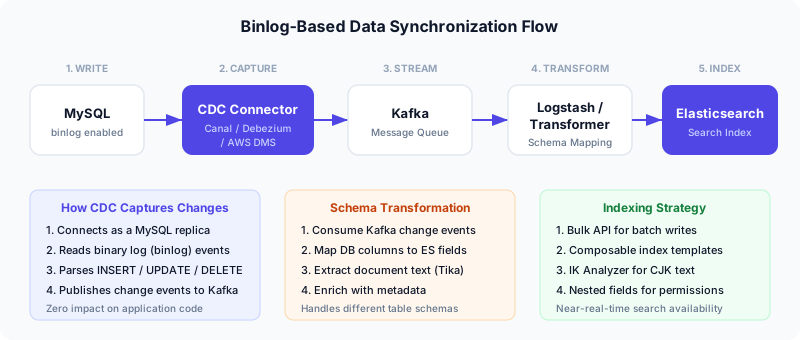
The pipeline works as follows:
- MySQL writes binlog events for every committed transaction.
- The CDC connector (Canal, Debezium, or AWS DMS) reads the binlog stream by posing as a MySQL replica.
- Change events are published to a Kafka topic, one event per row change.
- A schema transformer (Logstash, a custom service, or Kafka Streams) consumes the events, maps database columns to Elasticsearch fields, optionally extracts document text, and produces a new Kafka topic with ES-ready JSON documents.
- Logstash (or a custom consumer) reads from the output topic and calls the Elasticsearch Bulk API to index the documents.
Index Design
4.1 Full-Text Search Index Template
Elasticsearch 8.x uses composable index templates (_index_template) rather than the legacy _template API. Here is the full-text search template:
PUT _index_template/template_fulltext
{
  "index_patterns": ["fulltext-*"],
  "template": {
    "settings": {
      "number_of_shards": 1,
      "number_of_replicas": 1,
      "analysis": {
        "analyzer": {
          "ik_index_analyzer": {
            "type": "custom",
            "tokenizer": "ik_max_word"
          },
          "ik_search_analyzer": {
            "type": "custom",
            "tokenizer": "ik_smart"
          }
        }
      }
    },
    "mappings": {
      "properties": {
        "title": {
          "type": "text",
          "analyzer": "ik_index_analyzer",
          "search_analyzer": "ik_search_analyzer"
        },
        "summary": {
          "type": "text",
          "analyzer": "ik_index_analyzer",
          "search_analyzer": "ik_search_analyzer"
        },
        "content": {
          "type": "text",
          "analyzer": "ik_index_analyzer",
          "search_analyzer": "ik_search_analyzer"
        },
        "author": {
          "type": "keyword"
        },
        "document_type": {
          "type": "keyword"
        },
        "url": {
          "type": "keyword"
        },
        "publish_date": {
          "type": "date"
        },
        "update_date": {
          "type": "date"
        },
        "privilege": {
          "properties": {
            "data": {
              "type": "nested",
              "properties": {
                "type": {
                  "type": "keyword"
                },
                "id": {
                  "type": "keyword"
                }
              }
            }
          }
        }
      }
    }
  }
}
Note: The legacy
PUT _template/template_nameAPI is deprecated in ES 7.8+ and removed in ES 9. Always usePUT _index_template/template_namewith composable templates for ES 8.x and above.
4.2 Suggestion Index Template
The typeahead index uses the completion field type:
PUT _index_template/template_suggest
{
  "index_patterns": ["suggest-*"],
  "template": {
    "settings": {
      "number_of_shards": 1
    },
    "mappings": {
      "properties": {
        "suggest": {
          "type": "completion"
        },
        "weight": {
          "type": "integer"
        }
      }
    }
  }
}
Permission-Aware Search
In enterprise search, different users see different documents. There are two strategies:
| Strategy | When to Filter | Trade-off |
|---|---|---|
| Pre-retrieval filtering | At query time (ES filter clause) | Best performance; more complex queries |
| Post-retrieval filtering | After ES returns results | Simpler queries; wastes retrieval budget |
For high-performance search, pre-retrieval filtering is strongly preferred. We embed permission data directly in the document as a nested field:
{
  "title": "Q3 Financial Report",
  "content": "...",
  "privilege": {
    "data": [
      { "type": "staff", "id": "user-1234" },
      { "type": "department", "id": "dept-finance" },
      { "type": "department", "id": "dept-executive" }
    ]
  }
}
Each entry in privilege.data represents an entity (user or department) that is allowed to view the document. A user should see a document if they match any of the privilege entries — either their own user ID appears as a staff entry, or their department ID appears as a department entry.
The Permission Filter Query (Corrected)
The correct query uses a bool.should (OR) between the staff and department nested queries:
GET /fulltext-*/_search
{
  "query": {
    "bool": {
      "must": [
        {
          "multi_match": {
            "query": "financial report",
            "fields": ["title^3", "summary^2", "content"]
          }
        }
      ],
      "filter": [
        {
          "bool": {
            "should": [
              {
                "nested": {
                  "path": "privilege.data",
                  "query": {
                    "bool": {
                      "must": [
                        { "term": { "privilege.data.type": "staff" } },
                        { "term": { "privilege.data.id": "user-1234" } }
                      ]
                    }
                  }
                }
              },
              {
                "nested": {
                  "path": "privilege.data",
                  "query": {
                    "bool": {
                      "must": [
                        { "term": { "privilege.data.type": "department" } },
                        { "term": { "privilege.data.id": "dept-finance" } }
                      ]
                    }
                  }
                }
              }
            ],
            "minimum_should_match": 1
          }
        }
      ]
    }
  },
  "highlight": {
    "fields": {
      "title": {},
      "content": { "fragment_size": 200 }
    }
  }
}
Bug fix note: A common mistake is to place the two nested queries as separate items in the
filterarray, which applies an AND — meaning the user must match both a staff entry and a department entry. This causes most documents to be filtered out. The correct approach wraps them in abool.shouldwithminimum_should_match: 1, so matching either condition is sufficient.
Multi-Source Mixed Ranking and Pagination
This is the most architecturally interesting part of the system. When search results come from both Elasticsearch (scored by BM25) and a third-party API (scored by its own algorithm), we need to:
- Query both sources concurrently — use async/parallel calls to avoid sequential latency.
- Normalize scores — either rescale third-party scores to the ES score range, or apply configurable weights per source (e.g., ES results get a 1.2x multiplier).
- Merge and sort — interleave results by descending score to produce a single, unified page.
- Track per-source offsets — since we consume a different number of items from each source per page, we need dual cursors.
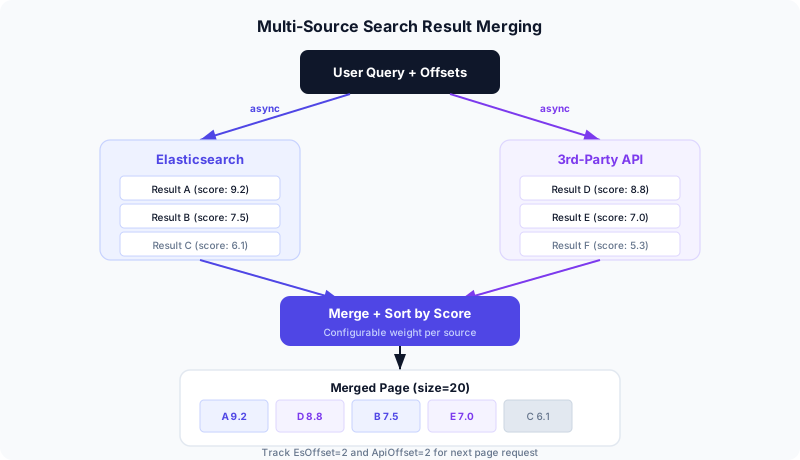
6.1 The Dual-Offset Pagination Algorithm
Standard offset-based pagination (from + size) breaks when results come from two independent sources. The solution is to track two independent offsets — one for each source — and let the merge process determine how many items from each source appear on each page.
# Pseudocode for the mixed-ranking search endpoint

async def search(query: str, es_offset: int, api_offset: int, page_size: int):
    # 1. Fetch from both sources in parallel
    es_results, api_results = await asyncio.gather(
        search_elasticsearch(query, offset=es_offset, limit=page_size),
        search_third_party(query, offset=api_offset, limit=page_size),
    )

    # 2. Merge by score (descending)
    merged = []
    es_used, api_used = 0, 0
    es_idx, api_idx = 0, 0

    while len(merged) < page_size:
        es_item = es_results[es_idx] if es_idx < len(es_results) else None
        api_item = api_results[api_idx] if api_idx < len(api_results) else None

        if es_item is None and api_item is None:
            break

        if api_item is None or (es_item and es_item.score >= api_item.score):
            merged.append(es_item)
            es_idx += 1
            es_used += 1
        else:
            merged.append(api_item)
            api_idx += 1
            api_used += 1

    return {
        "results": merged,
        "es_offset": es_offset,
        "api_offset": api_offset,
        "es_used": es_used,
        "api_used": api_used,
        "es_has_next": es_results.has_more,
        "api_has_next": api_results.has_more,
    }
6.2 Client-Side Pagination State
The frontend maintains an array of offset snapshots — one entry per page visited:
interface PageState {
  esOffset: number;
  apiOffset: number;
}

// Initialize
const pageHistory: PageState[] = [{ esOffset: 0, apiOffset: 0 }];

// After receiving page results:
function onNextPage(response: SearchResponse) {
  const nextState: PageState = {
    esOffset: response.es_offset + response.es_used,
    apiOffset: response.api_offset + response.api_used,
  };
  pageHistory.push(nextState);
}

// Go to previous page:
function onPrevPage() {
  pageHistory.pop();  // remove current
  const prev = pageHistory[pageHistory.length - 1];
  // re-fetch with prev.esOffset, prev.apiOffset
}
Walkthrough example with page_size = 20:
| Page | Request | Response | State |
|---|---|---|---|
| 1 | esOffset=0, apiOffset=0 | es_used=7, api_used=13 | [{0,0}] |
| 2 | esOffset=7, apiOffset=13 | es_used=12, api_used=8 | [{0,0}, {7,13}] |
| Back to 1 | Pop {7,13} → re-fetch {0,0} | Same as page 1 | [{0,0}] |
This approach sacrifices random-access page jumping (you cannot jump to page 5 directly), but it handles the fundamental complexity of merging two independent result streams with correct, deterministic pagination. For most search UIs, previous/next navigation is sufficient.
Hot Keyword Ranking with Time Decay
A naive hot-keyword implementation simply counts search frequency over a fixed window (e.g., the last 30 days). But this creates a problem: a keyword searched 101 times ten days ago will outrank one searched 100 times yesterday, even though the latter is clearly more “hot” right now.
The solution is a linear time-decay formula that gives more weight to recent searches.
7.1 The Decay Formula
Given:
- T = the size of the time window (e.g., 30 days)
- c_i = the search count on day i, where i = 0 is yesterday and i = T-1 is the oldest day
- w = base weight (default 1.0)
The hot score for a keyword is:
hot = (w / T) × Σ (T - i) × cᵢ for i = 0 to T-1Expanding for T = 30:
hot = (30 * c_0 + 29 * c_1 + 28 * c_2 + ... + 1 * c_29) / 30How it works: Yesterday’s searches (c_0) are multiplied by 30, the day before (c_1) by 29, and so on. Searches from 30 days ago (c_29) are multiplied by just 1. This creates a smooth linear decay where recent activity is worth up to 30x more than activity at the edge of the window.
7.2 Implementation
from datetime import datetime, timedelta
from collections import defaultdict

def compute_hot_keywords(
    search_logs: list[dict],    # [{"keyword": str, "date": date}, ...]
    window_days: int = 30,
    top_n: int = 50,
    base_weight: float = 1.0,
) -> list[dict]:
    """Compute hot keyword scores with linear time decay."""
    today = datetime.utcnow().date()
    scores = defaultdict(float)

    for log in search_logs:
        keyword = log["keyword"]
        days_ago = (today - log["date"]).days
        if days_ago < 0 or days_ago >= window_days:
            continue

        # Linear decay: recent days get higher weight
        decay_factor = window_days - days_ago
        scores[keyword] += decay_factor * base_weight / window_days

    # Sort by score descending, take top N
    ranked = sorted(scores.items(), key=lambda x: -x[1])[:top_n]
    return [{"keyword": k, "score": round(s, 2)} for k, s in ranked]
The daily cron job computes these scores, stores the top N in MySQL (for manual curation — editors can pin, remove, or reorder terms), and caches the final list in Redis for sub-millisecond retrieval by the Search API.
7.3 Extensions
- Synonym merging: Before scoring, normalize synonyms so that “ES”, “Elasticsearch”, and “elastic search” are counted as one keyword. A simple alias map or edit-distance threshold works for most cases.
- Burst detection: Add a multiplier for keywords whose daily count exceeds 2x the rolling average — this surfaces sudden spikes more aggressively.
- Exponential decay variant: Replace
(T - i)withe^{-lambda * i}for a sharper dropoff. The linear formula is simpler to explain and tune, but exponential decay is better at suppressing old-but-frequent terms.
Typeahead Suggestions with Completion Suggester
Elasticsearch’s Completion Suggester is a purpose-built data structure (an FST — Finite State Transducer) optimized for prefix-based autocomplete. It lives entirely in memory and returns results in sub-millisecond time.
8.1 Indexing Suggestions
A daily batch job computes the top 1000+ search terms from the last 90 days and writes them to the suggestion index:
POST suggest-v1/_doc
{
  "suggest": {
    "input": ["elasticsearch", "elastic search", "ES"],
    "weight": 85
  }
}
The input array allows multiple surface forms (including common misspellings) to map to the same suggestion. The weight field controls ranking — higher-weight suggestions appear first.
8.2 Querying Suggestions
GET suggest-v1/_search
{
  "suggest": {
    "keyword-suggest": {
      "prefix": "elast",
      "completion": {
        "field": "suggest",
        "size": 10,
        "skip_duplicates": true
      }
    }
  }
}
This returns the top 10 suggestions whose input starts with “elast”, deduplicated and sorted by weight.
Putting It All Together: The Search API
Here is a high-level view of the search endpoint that ties everything together:
@app.get("/api/search")
async def search(
    q: str,
    sort_by: str = "relevance",  # "relevance" or "date"
    es_offset: int = 0,
    api_offset: int = 0,
    page_size: int = 20,
    user: User = Depends(get_current_user),
):
    # 1. Build the ES query with permission filter
    es_query = build_search_query(
        keyword=q,
        user_id=user.id,
        department_id=user.department_id,
        sort_by=sort_by,
    )

    # 2. Query ES and third-party API concurrently
    es_results, api_results = await asyncio.gather(
        es_client.search(
            index="fulltext-*",
            body=es_query,
            from_=es_offset,
            size=page_size,
        ),
        third_party_client.search(q, offset=api_offset, limit=page_size),
    )

    # 3. Merge results by score
    merged = merge_and_rank(es_results, api_results, page_size)

    # 4. Log the search event (async, non-blocking)
    asyncio.create_task(log_search_event(user.id, q))

    return merged


@app.get("/api/search/hot")
async def hot_keywords():
    """Return cached hot keywords (refreshed daily by cron)."""
    cached = await redis.get("search:hot_keywords")
    if cached:
        return json.loads(cached)
    return await refresh_hot_keywords_from_db()


@app.get("/api/search/suggest")
async def suggest(prefix: str):
    """Typeahead suggestions via ES Completion Suggester."""
    result = await es_client.search(
        index="suggest-*",
        body={
            "suggest": {
                "keyword-suggest": {
                    "prefix": prefix,
                    "completion": {
                        "field": "suggest",
                        "size": 10,
                        "skip_duplicates": True,
                    }
                }
            }
        }
    )
    suggestions = [
        opt["text"]
        for opt in result["suggest"]["keyword-suggest"][0]["options"]
    ]
    return {"suggestions": suggestions}
Future Optimizations
Data Quality
- Document deduplication — use SimHash or MinHash to detect near-duplicate documents and merge them at index time.
- Content cleaning — strip boilerplate (navigation, footers, ads) from HTML documents before indexing.
- Source-level weight configuration — allow administrators to set per-index or per-source boosting factors without redeploying.
Search Quality
- Custom dictionary management — augment the IK analyzer’s dictionary with domain-specific terms from the hot keyword table and manual curation.
- Synonym expansion — configure ES synonym token filters so that “K8s” matches “Kubernetes”.
- Spell correction — use the Phrase Suggester or a dedicated spell-check layer to handle typos.
- Click-through rate (CTR) tracking — log which results users actually click, and feed that signal back into relevance scoring via a
function_scorewrapper.
Infrastructure
- Index lifecycle management (ILM) — automatically roll over, shrink, and delete old indices to control storage costs.
- Search relevance testing — use the ES Ranking Evaluation API to run automated relevance benchmarks as you tune analyzers and scoring.
- Observability — track p50/p95/p99 query latency, zero-result rate, and suggestion acceptance rate as key search health metrics.
References
References
- Elasticsearch reference — Elastic
- IK Analysis plugin for Chinese — GitHub
- Elasticsearch text analyzers — Elastic