Building an Enterprise Agentic AI Platform with Kiro and AWS
We built a full AI agent platform in one week using Kiro IDE — zero hand-written code. Here's exactly how.
中文版 / Chinese Version: 本文最初发表于微信公众号。阅读中文原文 →
How we used Kiro (an AI IDE from AWS) to complete the entire development lifecycle — from requirements to deployment — building a production-ready AI Agent platform on Strands Agents, Amazon Bedrock AgentCore, and AWS infrastructure. One person, one week, zero hand-written code.
Why “Delivery-Focused” AI Agents?
Most AI chat products stop at conversation. You ask a question, get a text response, and that’s it. But enterprise scenarios demand deliverables: architecture diagrams, deployed web pages, billing analysis reports, executable code.
That’s why we built this AI Agent platform. Users describe what they need in natural language, and the Agent produces tangible outputs — images, videos, documents, data analysis, deployed static websites, even AWS architecture diagrams.
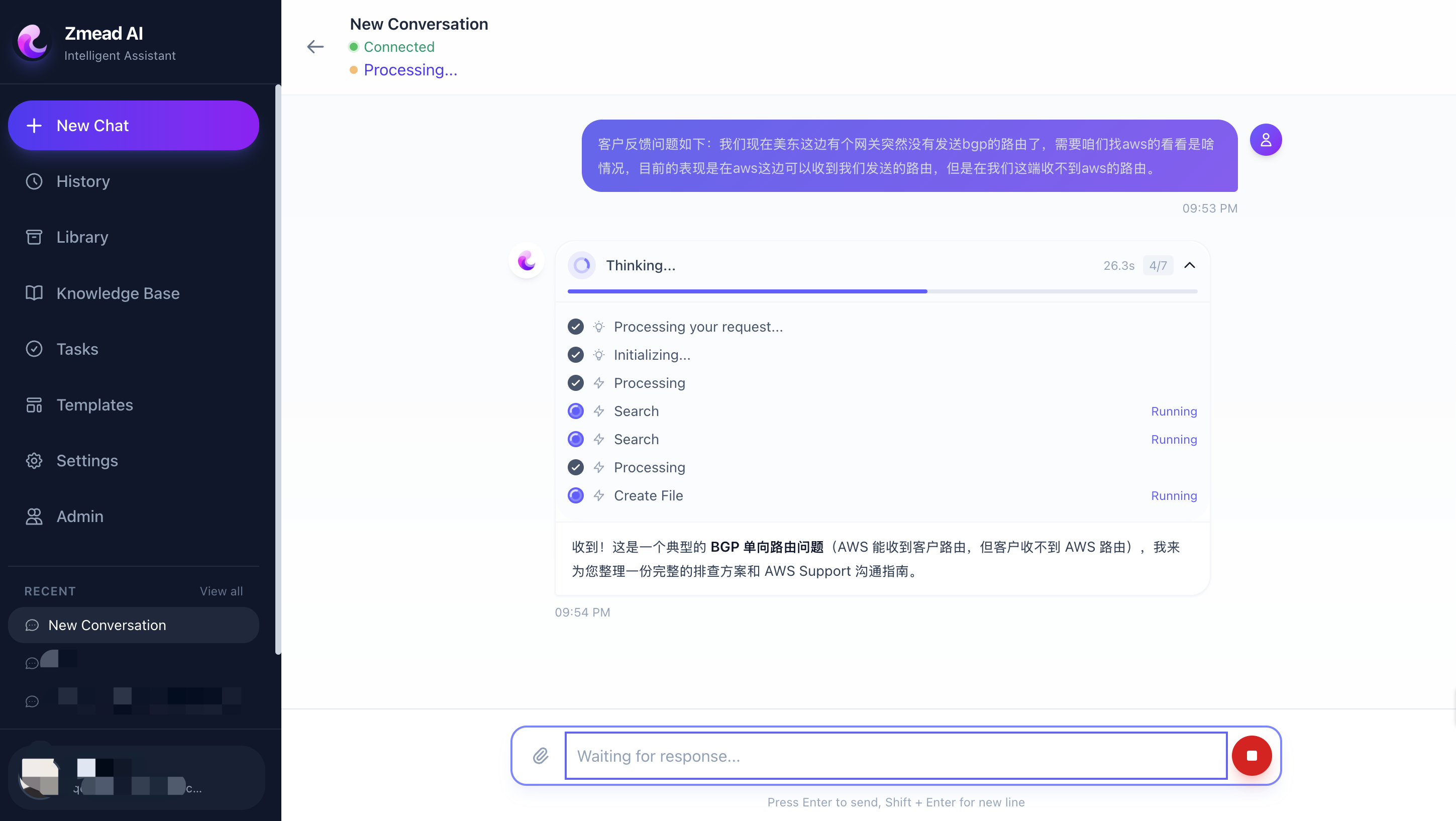 Platform main interface — left sidebar shows conversations and navigation, right side displays the agent chat with real-time tool execution progress and deliverable output.
The challenge isn’t “building an agent” — it’s making one run reliably in production: auto-scaling, secure code execution sandboxes, cross-session memory persistence, multi-tool orchestration. Building these capabilities from scratch would take months.
Our answer is a three-layer runtime architecture: Strands Agents (agent framework) + Amazon Bedrock AgentCore (runtime + memory + sandbox) + AWS CDK (infrastructure as code).
And the critical part — the entire platform was developed end-to-end by AI.
Development Layer: Building Everything with Kiro
The most remarkable aspect of this project: from requirements gathering, architecture design, task breakdown, code development, testing, to deployment — everything was done by Kiro (an AI IDE from AWS), with zero hand-written code.
This isn’t “AI-assisted development.” It’s genuine AI-driven development — humans describe intent and accept results, Kiro handles the entire pipeline from intent to code.
Spec-Driven Development: From Vague Ideas to Executable Tasks
Kiro’s core workflow is Spec-Driven Development. You describe what you want in natural language, and Kiro automatically generates a three-layer specification:
Step 1: Requirements Document
We told Kiro: “Build a delivery-focused AI Agent platform where users converse with an Agent that produces images, videos, documents, and web pages. Backend uses FastAPI + Strands Agents, deployed on AgentCore Runtime.”
Kiro automatically generated a structured requirements document with user stories, acceptance criteria, and technical constraints:
### Requirement 1: User Authentication
**User Story:** As a user, I want to sign in with my Google account,
so that I can securely access my personal workspace and deliverables.
### Requirement 3: Agent Tool Integration
**User Story:** As a user, I want the Agent to execute code, browse web,
generate images/videos, and deploy web pages...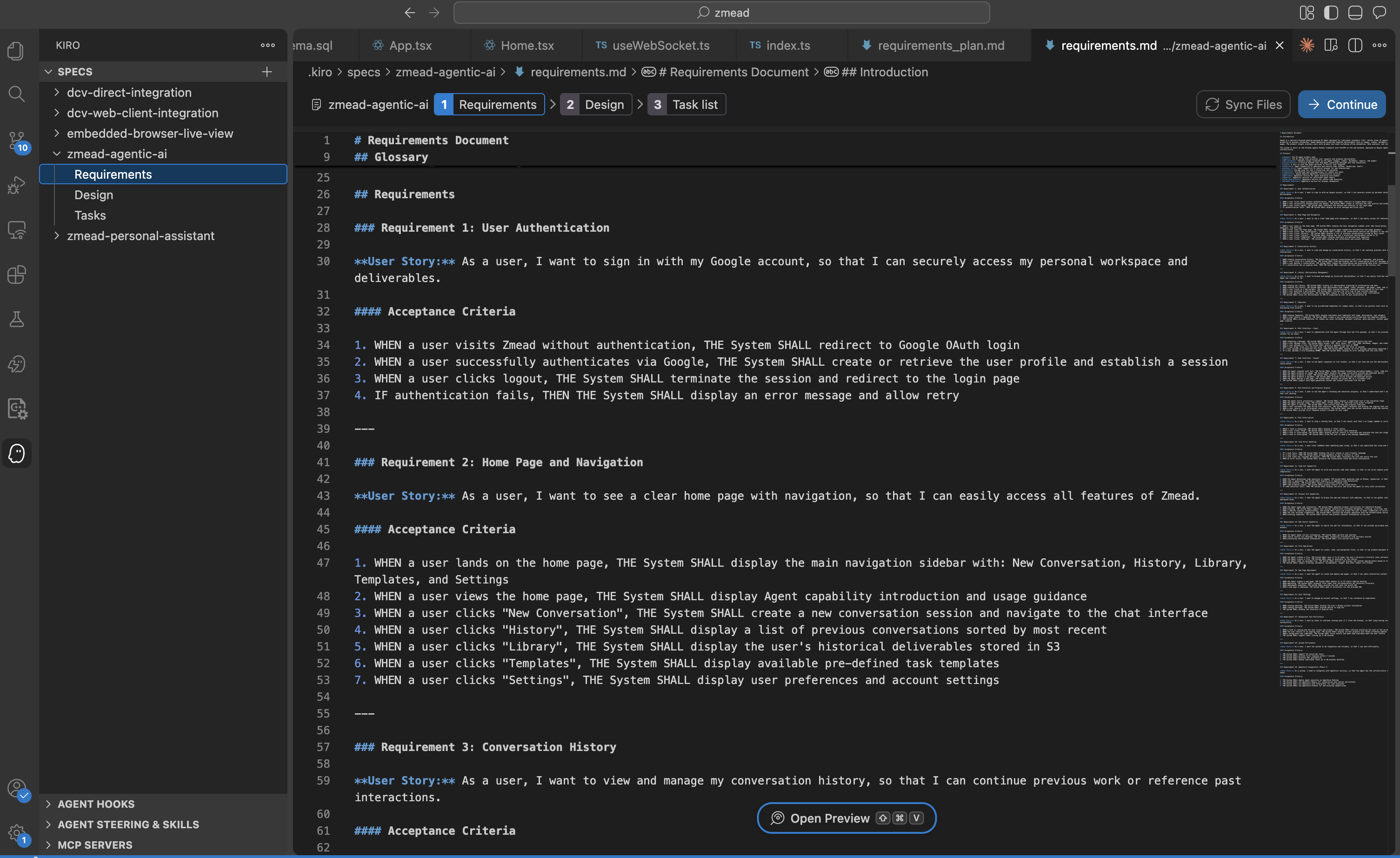 Kiro Spec-Driven Development generates structured requirements with user stories, acceptance criteria, and technical constraints.
Step 2: Technical Design
After confirming requirements, Kiro generates a technical design document — database schema, API definitions, component architecture, sequence diagrams:
## Architecture
The architecture follows a three-tier design:
1. Frontend: React-based SPA for user interaction
2. Backend API: FastAPI server handling authentication and API routing
3. Agent Runtime: Strands Agent deployed on AgentCore Runtime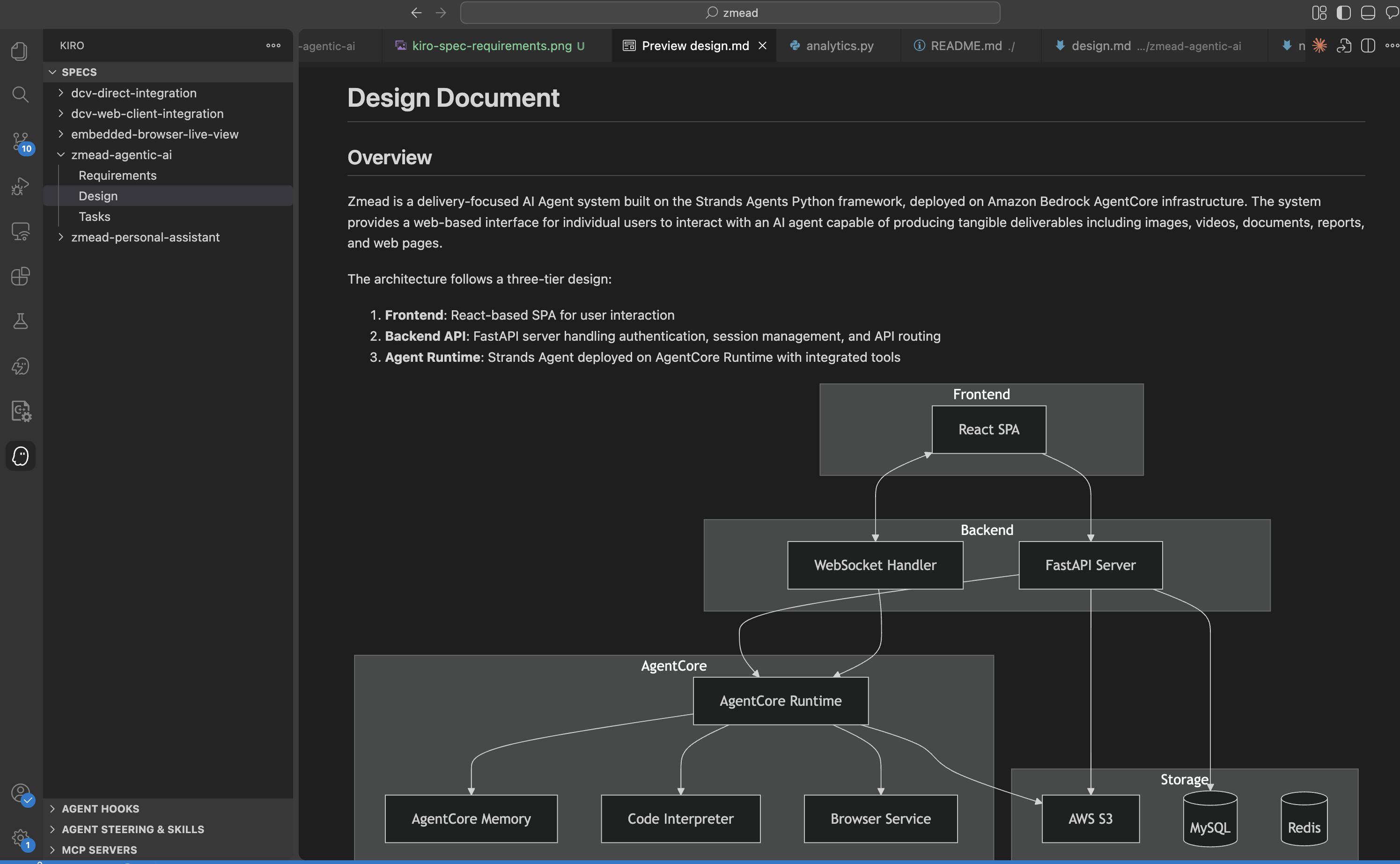 Kiro generates technical design covering system architecture, database schema, API definitions, and component interaction sequences.
Step 3: Task Breakdown
After the design, Kiro breaks the entire project into incremental executable tasks, each linked to its corresponding requirement:
- [x] 1.1 Initialize frontend project with React, TypeScript, and TailwindCSS
- [x] 1.2 Initialize backend project with FastAPI
- [x] 1.3 Set up database schemas and connections
- [x] 1.4 Set up Redis connection and utilities
- [x] 2.1 Implement Google OAuth authentication flow
- [x] 3.1 Implement Strands Agent with BedrockModel
- [x] 3.2 Implement Code Interpreter tool with AgentCore
...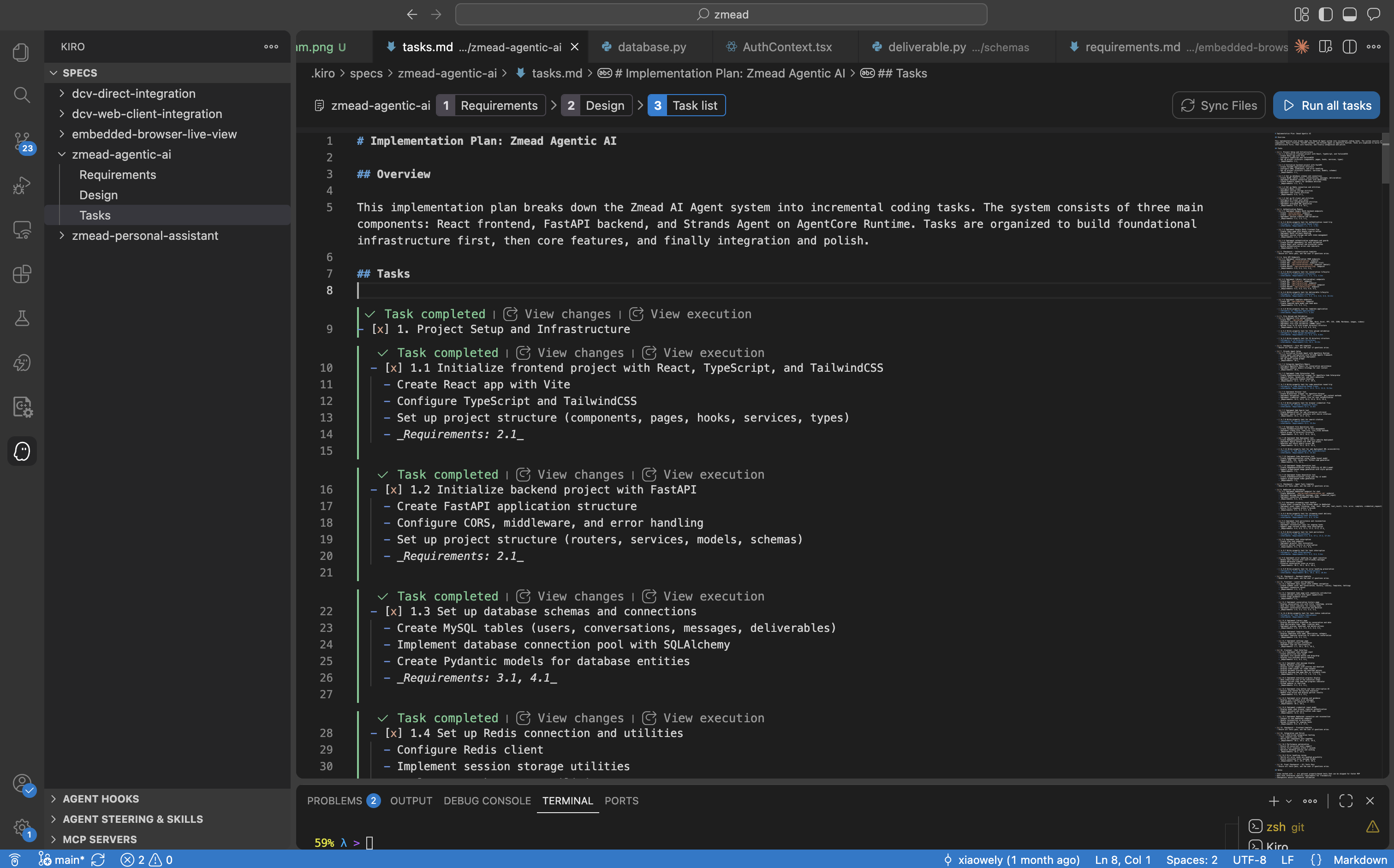 Kiro generates incremental tasks linked to requirements, executing them sequentially until all are complete.
Kiro then executes these tasks one by one — writing code, creating files, configuring dependencies, running tests — until everything is done.
Vibe Coding: Conversational Iterative Development
Beyond Spec-Driven structured development, day-to-day feature iteration and bug fixes use Vibe Coding — describing requirements to Kiro in natural language, and it modifies code immediately.
For example:
- “Add file preview to the Library page”
- “Use AWS official SVG icons when the Agent generates architecture diagrams”
- “Auto-reconnect WebSocket after disconnect, max 3 retries”
Kiro understands project context through Steering Files (architecture docs and tech stack descriptions) and locates the right files to modify.
Steering Files: Giving AI the Full Picture
Kiro’s accuracy in writing code comes from Steering Files — project context documents placed in the .kiro/steering/ directory. We configured four core documents that ensure Kiro follows the project’s architecture patterns and coding conventions consistently.
Hooks: Automated Quality Assurance
Kiro’s Hooks mechanism enables automated quality checks:
- API Test Hook: When files under
routers/,schemas/, orservices/are modified, automatically run Postman collection tests - Structure Sync Hook: When new files are created, automatically update
structure.mdto keep documentation in sync
{
  "name": "API Postman Testing",
  "when": {
    "type": "fileEdited",
    "patterns": ["backend/app/routers/*.py", "backend/app/schemas/*.py"]
  },
  "then": {
    "type": "askAgent",
    "prompt": "API source code has been modified. Run Postman collection tests..."
  }
}
MCP Server Integration: Real-Time Documentation Access
During development, Strands Agents and AgentCore were rapidly iterating services. We configured Model Context Protocol (MCP) Servers to give Kiro real-time access to the latest official documentation:
- Strands Agents MCP Docs Server — latest SDK API docs, tool development guides, deployment examples
- AgentCore MCP Docs Server — latest Runtime, Memory, Code Interpreter, and Browser documentation
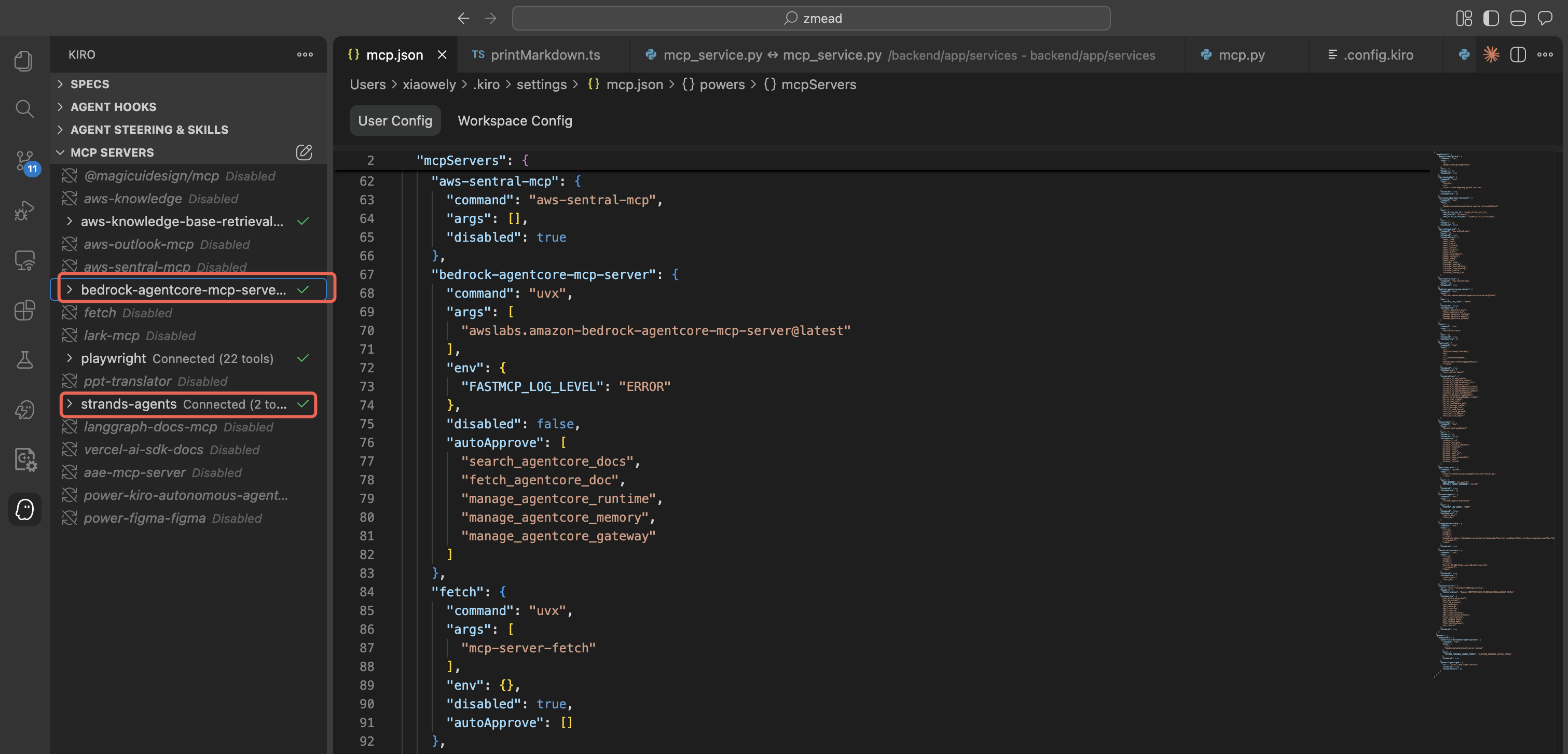 Kiro configured with MCP Servers for Strands Agents Docs and AgentCore Docs, ensuring real-time reference to the latest official documentation.
This means when Kiro writes Agent code, it references real-time official docs, not potentially outdated training data.
Development Efficiency: Days Instead of Months
If built the traditional way, this project would require a 3-5 person team working 2-3 months. With Kiro, one person completed the entire pipeline from zero to production deployment in one week.
Overall Architecture
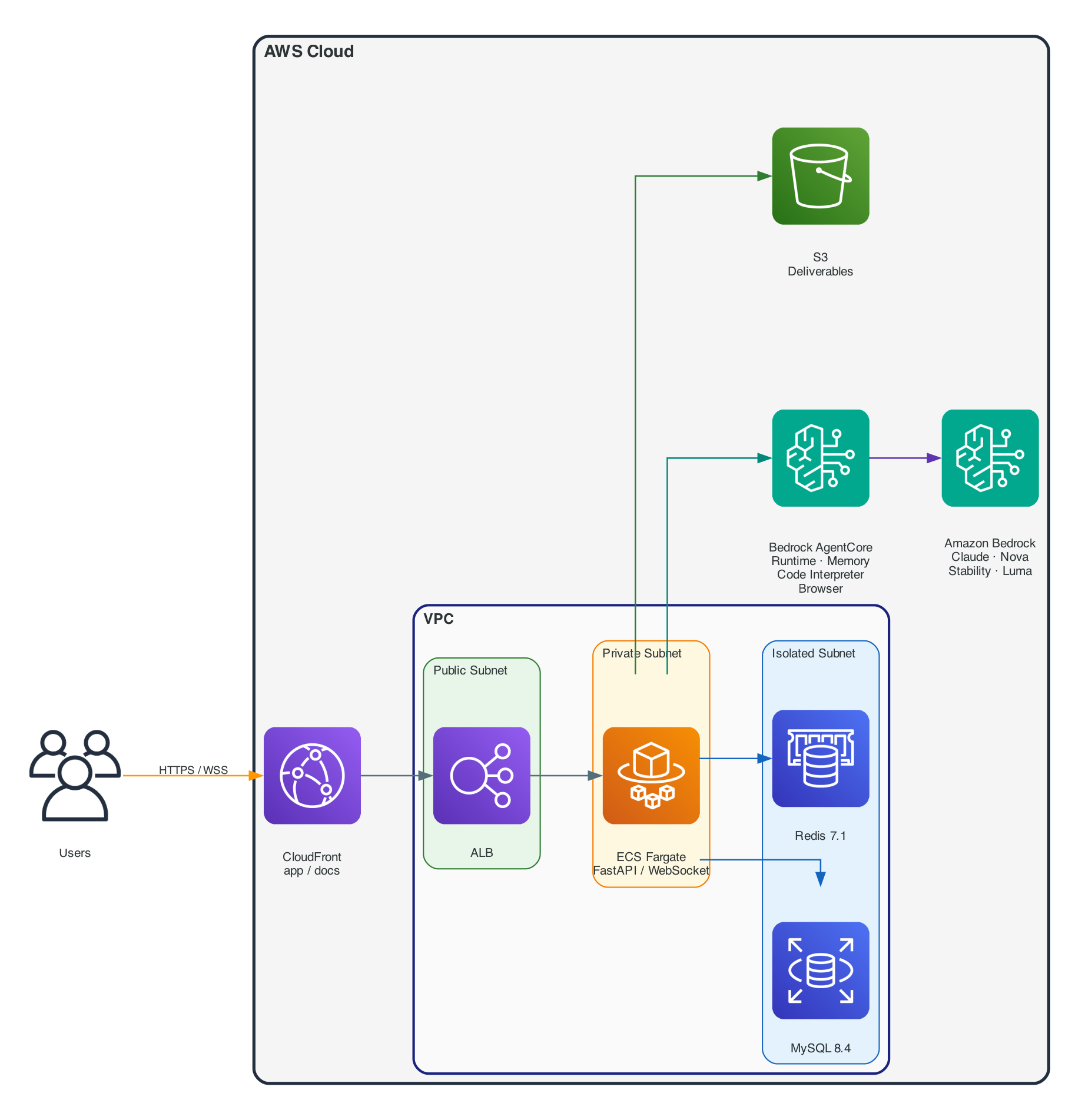 Platform architecture — user requests enter the VPC through CloudFront, reach the FastAPI backend on ECS Fargate via ALB, the Agent calls LLM and tools through Bedrock AgentCore, and deliverables are stored in S3.
The entire architecture runs within AWS Cloud, with the VPC divided into three subnet tiers (Public / Private / Isolated). Bedrock AgentCore provides Runtime auto-scaling, Memory persistence, Code Interpreter sandboxing, and managed Browser. Amazon Bedrock serves as the LLM platform providing Claude, Amazon Nova, Stability AI, Luma, and other models.
Runtime Layer 1: Strands Agents — The Agent Framework
Why Strands?
After evaluating multiple agent frameworks, we chose Strands Agents for a simple reason: lightweight enough, flexible enough. Tools are just Python methods with @tool decorators. The framework handles the Agent Loop, conversation management, and model calls. No complex graph structures to define, no proprietary DSL to learn.
Strands Agents SDK natively supports Amazon Bedrock as a model provider, meaning we can directly use Claude, Amazon Nova, Stability AI, Luma, and other models on Bedrock without additional adapter layers.
Core Agent Implementation
The Agent initialization code is remarkably concise:
from strands import Agent
from strands.models import BedrockModel
from strands.agent.conversation_manager import SlidingWindowConversationManager

class MyAgent:
    def __init__(self, user_id: str, conversation_id: str, config: AgentConfig):
        # Initialize model via Amazon Bedrock
        self.model = BedrockModel(
            model_id="us.anthropic.claude-sonnet-4-6",
            region_name="us-west-2",
            temperature=0.7,
            max_tokens=128000,
        )

        # Load tools — core tools always loaded, domain tools loaded per user's enabled Skills
        self.tools = get_agent_tools(
            user_id=user_id,
            conversation_id=conversation_id,
            config=config,
        )

        # Create Strands Agent
        self.agent = Agent(
            model=self.model,
            tools=self.tools,
            system_prompt=config.system_prompt,
            conversation_manager=SlidingWindowConversationManager(window_size=35),
        )
SlidingWindowConversationManager is key for long conversations — it keeps only the most recent N turns of context, preventing token overflow while maintaining conversation coherence.
Tool Pattern: @tool Decorator
Every tool follows the class method + @tool decorator pattern:
from strands import tool

class CodeInterpreterTool:
    def __init__(self, region: str, user_id: str, conversation_id: str):
        self.region = region
        self.user_id = user_id

    @tool
    def execute_code(self, code: str, language: str = "python") -> str:
        """Execute code in a secure sandbox. Supports Python, JavaScript, and Shell.

        Args:
            code: The code to execute
            language: Programming language (python, javascript, shell)
        """
        # Executes via Amazon Bedrock AgentCore Code Interpreter — isolated sandbox
        ...
The docstring automatically becomes the tool description the LLM sees, and type annotations become the parameter schema. Strands Agents handles everything else — parameter serialization, response parsing, result injection into the Agent Loop.
We built 15+ tools using this pattern.
Dynamic Tool Loading: The Skills System
Not every user needs every tool. We built a Skills system that dynamically loads tools based on user-enabled Skills:
# Core tools — always loaded
tools = [code_interpreter, browser, web_search, file_ops, ...]

# Domain tools — loaded only when corresponding Skills are enabled
requested = set(domain_tool_names or [])
if "aws_pricing" in requested:
    tools.append(AWSPricingTool(region=config.aws_region).query_price)
if "architecture_diagram" in requested:
    tools.extend([arch.generate_diagram, arch.modify_diagram, arch.list_aws_icons])
Fewer tools means more accurate LLM decisions. This was an important lesson from practice.
Runtime Layer 2: Amazon Bedrock AgentCore — Runtime, Memory, and Sandbox
Amazon Bedrock AgentCore provides three core capabilities that would take months to build from scratch: serverless runtime, persistent memory, and secure code execution sandbox.
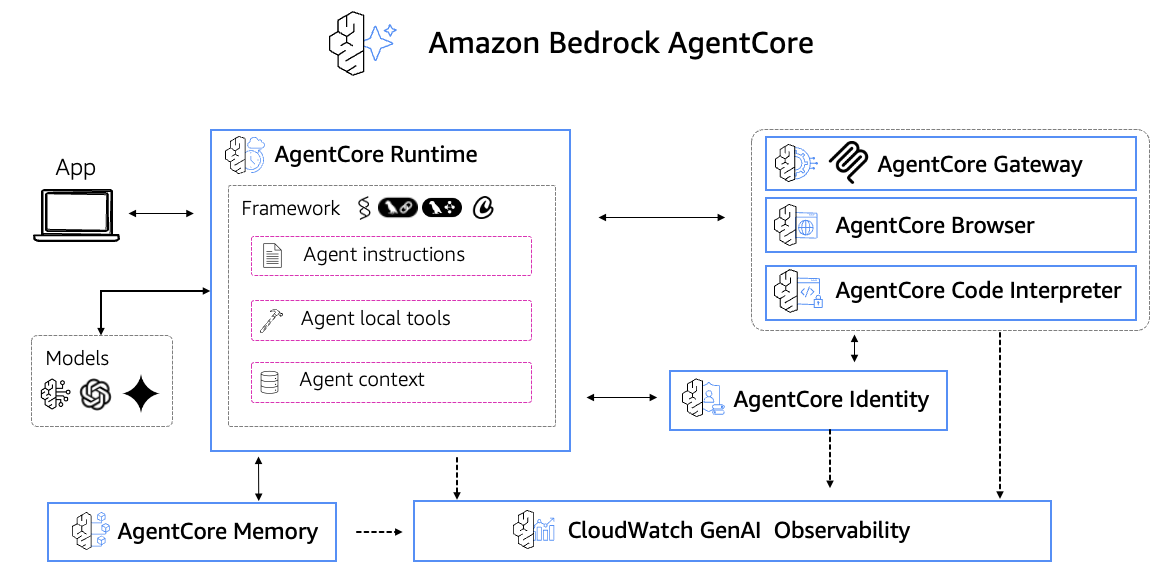 Amazon Bedrock AgentCore — providing Runtime, Memory, Code Interpreter, and Browser capabilities for production-grade agent operations.
AgentCore Runtime: Same Code, Dev to Production
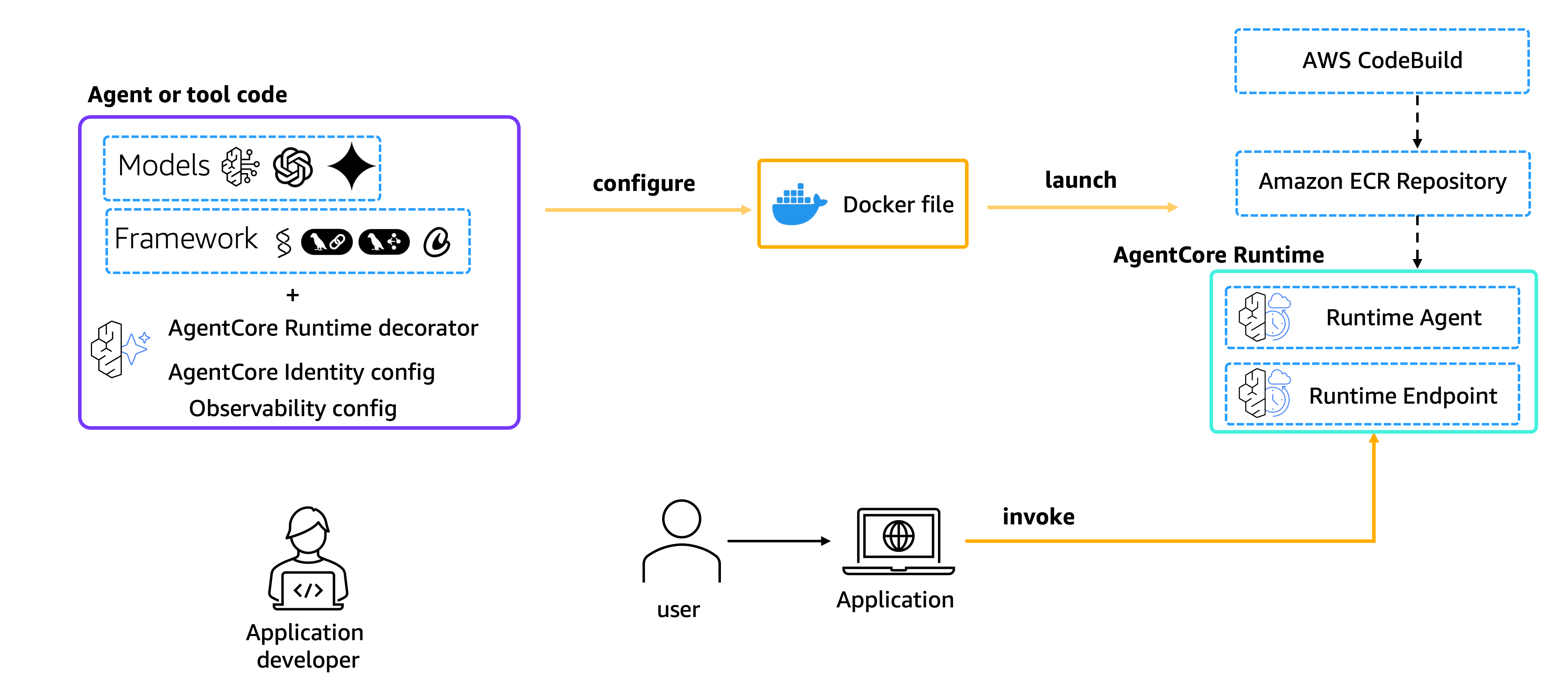 AgentCore Runtime — deploy agent code to Runtime for automatic container orchestration, elastic scaling, session management, and health checks.
The most elegant part of the architecture is the dual execution mode. The AgentCore Runtime entry point only needs:
from bedrock_agentcore import BedrockAgentCoreApp
from bedrock_agentcore.runtime.context import RequestContext

app = BedrockAgentCoreApp()

@app.entrypoint
async def invoke(payload: dict, context: RequestContext):
    """AgentCore Runtime HTTP SSE streaming entry point"""
    user_id = payload.get("user_id", context.session_id)
    conversation_id = payload.get("conversation_id", context.session_id)

    agent = MyAgent(user_id=user_id, conversation_id=conversation_id)

    async for event in agent.process_message(payload["prompt"]):
        yield event  # Server-Sent Events streaming back to caller

if __name__ == "__main__":
    app.run()
AgentCore Runtime handles container orchestration, auto-scaling, health checks, and session management. Deployment is just:
# Build and push container to Amazon ECR
docker build --platform linux/arm64 -t $ECR_URI:latest -f Dockerfile.agentcore .
docker push $ECR_URI:latest

# Update AgentCore Runtime
aws bedrock-agentcore-control update-agent-runtime \
    --agent-runtime-id $AGENT_ID \
    --agent-runtime-artifact '{"containerConfiguration":{"containerUri":"'$ECR_URI':latest"}}'
The FastAPI side switches modes with a single environment variable:
if settings.agentcore_runtime_enabled:
    # Production: stream via AgentCore Runtime (HTTP SSE)
    async for event in agentcore_service.invoke_stream(payload):
        await websocket.send_json(event)
else:
    # Development: Agent runs directly in-process
    async for event in agent.process_message(message):
        await websocket.send_json(event)
Local development uses agentcore launch --local for a local Runtime instance with the exact same experience as production.
AgentCore Memory: Cross-Session Memory
Amazon Bedrock AgentCore Memory provides two persistence capabilities:
- Short-Term Memory — stores recent conversation content as events with auto-expiration
- Long-Term Memory — semantically extracts and stores key facts about users for cross-session personalization
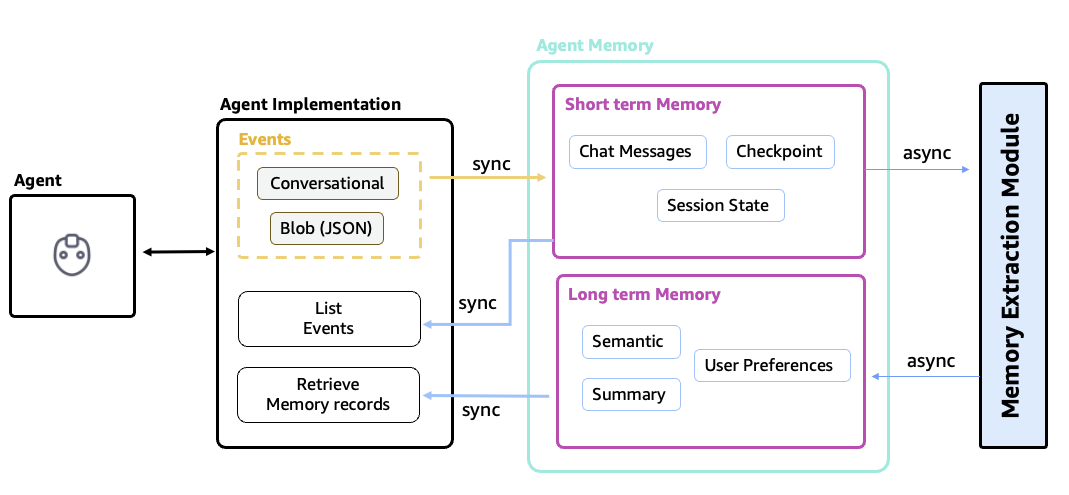 AgentCore Memory — short-term memory stores recent conversation events with auto-expiration, long-term memory persists key user facts through semantic extraction.
Integration with Strands Agents is through the SDK’s Session Manager:
from bedrock_agentcore.memory.integrations.strands.session_manager import (
    AgentCoreMemorySessionManager,
)
from bedrock_agentcore.memory.integrations.strands.config import (
    AgentCoreMemoryConfig,
    RetrievalConfig,
)

memory_config = AgentCoreMemoryConfig(
    memory_id="my_agent_memory_id",
    region="us-west-2",
    retrieval_config=RetrievalConfig(max_results=20, retrieval_type="SEMANTIC"),
)

session_manager = AgentCoreMemorySessionManager(config=memory_config)

# Pass to Strands Agent — auto-handles persistence and context retrieval
agent = Agent(model=self.model, tools=self.tools, session_manager=session_manager)
The Session Manager automatically persists conversation turns. When a new session starts, it automatically retrieves relevant context. Users can return the next day and the Agent still remembers previous context.
AgentCore Code Interpreter: Secure Sandbox
When users ask “analyze this CSV” or “run this Python script,” we need an isolated execution environment. AgentCore Code Interpreter provides temporary sandboxes pre-loaded with pandas, matplotlib, numpy, and other data science libraries. Each execution runs in an isolated sandbox with no cross-user contamination and automatic cleanup.
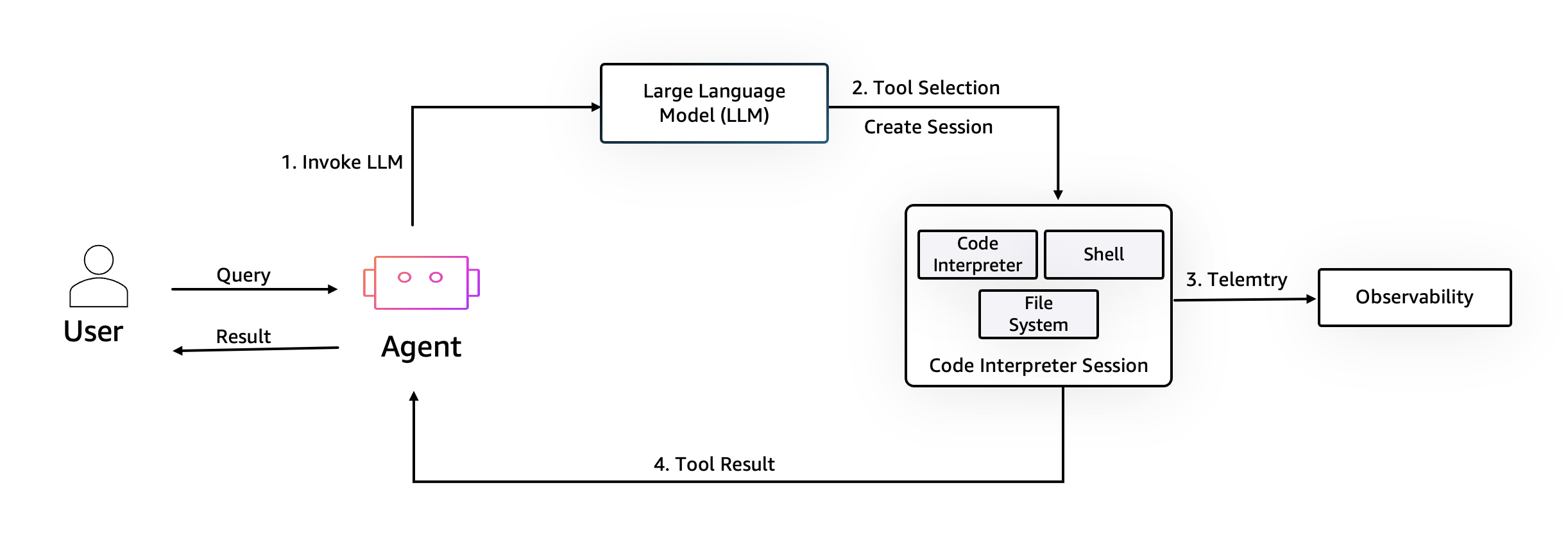 Agent executing Python code in an AgentCore Code Interpreter isolated sandbox, generating data analysis charts.
AgentCore Browser: Browser Use
Web scraping, form filling, and live browsing are handled through AgentCore Browser, which provides managed Chrome instances that the Agent can control programmatically. Combined with Amazon DCV streaming, users can even watch the Agent browse the web in real-time within the UI.
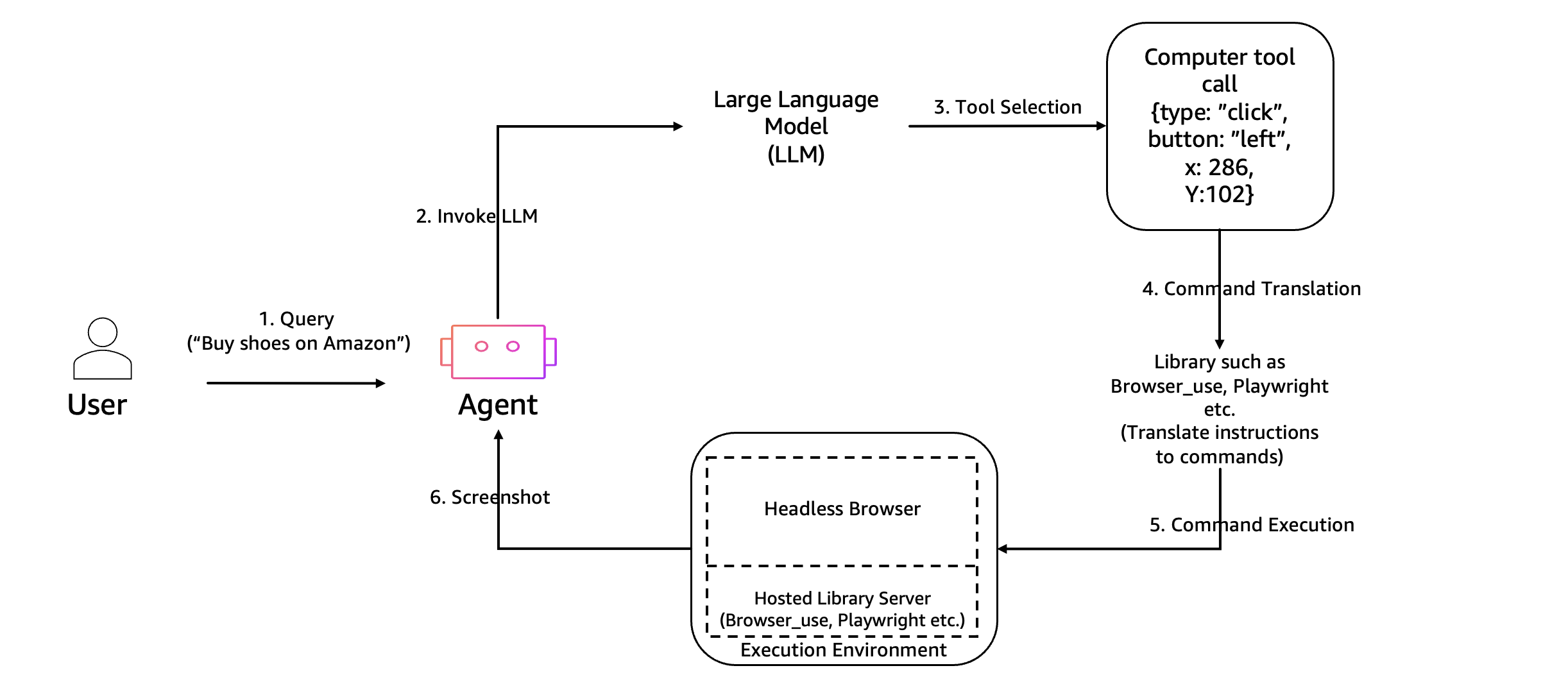 AgentCore Browser — Agent controls managed Chrome instances via API, results streamed back via screenshots or DCV.
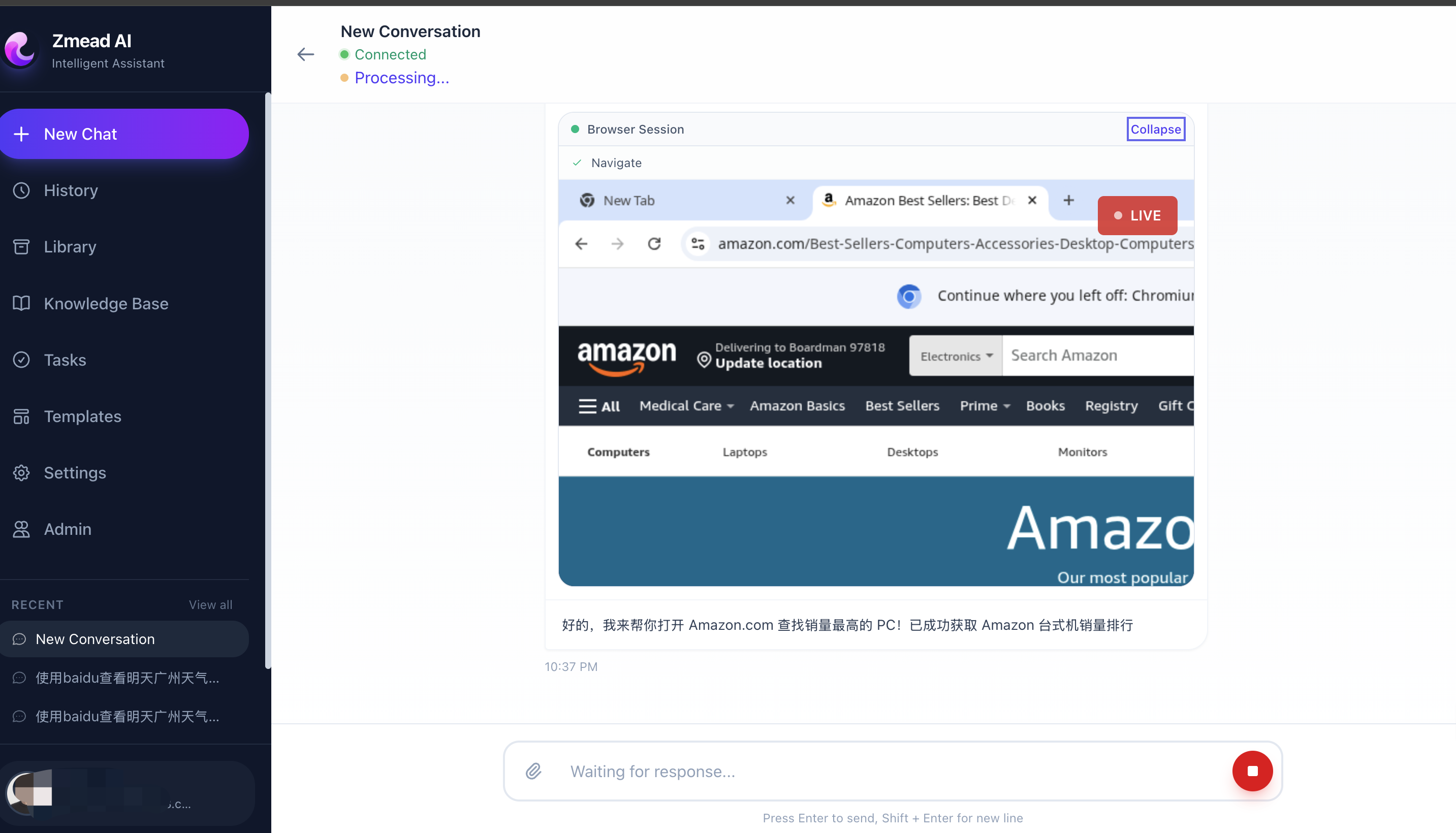 Agent browsing the web through AgentCore Browser, with the user watching live in an embedded browser window.
Runtime Layer 3: AWS Infrastructure — CDK All the Way
The entire infrastructure is defined in a single AWS CDK Stack — reproducible and version-controlled.
Core Infrastructure
// VPC with three subnet tiers: public, private, isolated
const vpc = new ec2.Vpc(this, 'Vpc', {
    maxAzs: 2,
    natGateways: 1,  // Cost optimization: single NAT Gateway
    subnetConfiguration: [
        { name: 'Public', subnetType: ec2.SubnetType.PUBLIC },
        { name: 'Private', subnetType: ec2.SubnetType.PRIVATE_WITH_EGRESS },
        { name: 'Isolated', subnetType: ec2.SubnetType.PRIVATE_ISOLATED },
    ],
});

// RDS MySQL 8.4 in isolated subnet — no internet access
const mysql = new rds.DatabaseInstance(this, 'Mysql', {
    engine: rds.DatabaseInstanceEngine.mysql({
        version: rds.MysqlEngineVersion.VER_8_4_7,
    }),
    instanceType: ec2.InstanceType.of(ec2.InstanceClass.T4G, ec2.InstanceSize.MICRO),
    vpcSubnets: { subnetType: ec2.SubnetType.PRIVATE_ISOLATED },
});

// ElastiCache Redis 7.1 for sessions and caching
const redis = new elasticache.CfnCacheCluster(this, 'Redis', {
    cacheNodeType: 'cache.t4g.micro',
    engine: 'redis',
    engineVersion: '7.1',
});
Service Layer
The FastAPI backend runs on ECS Fargate behind an Application Load Balancer. The React frontend is served from S3 through CloudFront. This separation means frontend deploys take ~1 minute (S3 sync + CloudFront invalidation), while backend deploys are independent rolling updates.
CloudFront (app.example.com)  → S3 (React SPA)
CloudFront (docs.example.com) → S3 (Knowledge Portal)
ALB (api.example.com)         → ECS Fargate (FastAPI)
One-Command Deployment
./deploy.sh all          # Full deploy (infrastructure + frontend)
./deploy.sh frontend     # Frontend only (~1 minute)
./deploy.sh backend      # ECS rolling update (~10s to trigger)
./deploy.sh agent        # Deploy AgentCore Runtime Agent
./deploy.sh status       # Show current endpoints
Platform Capabilities
Deliverables Management
All files produced by the Agent — images, documents, code, deployed pages — are stored in S3 and managed through the Library page.
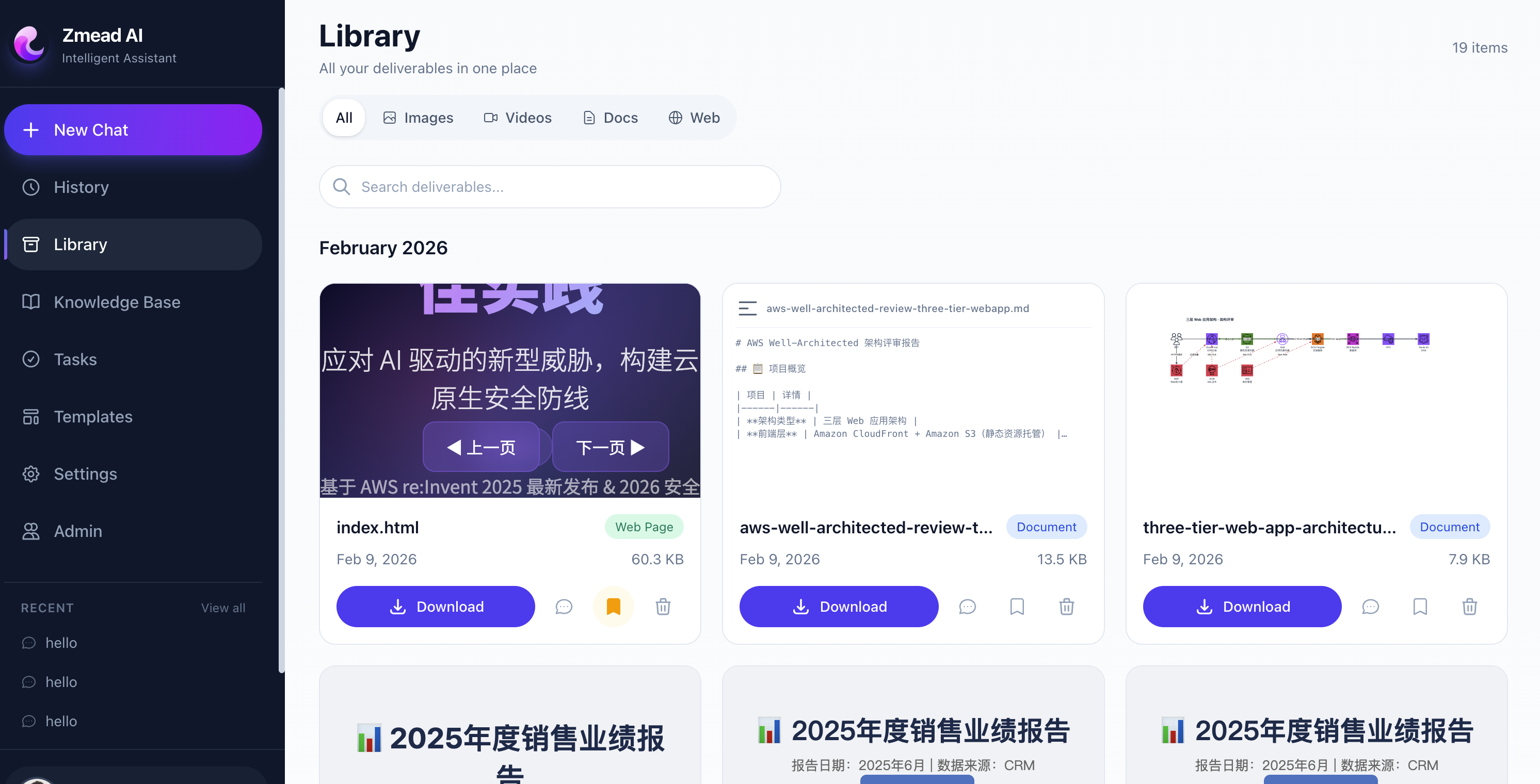 Library page — unified management of all agent deliverables with type filtering, online preview, and one-click download.
Architecture Diagram Generation
The Agent generates Draw.io format architecture diagrams using AWS official icons, supporting online viewing and editing.
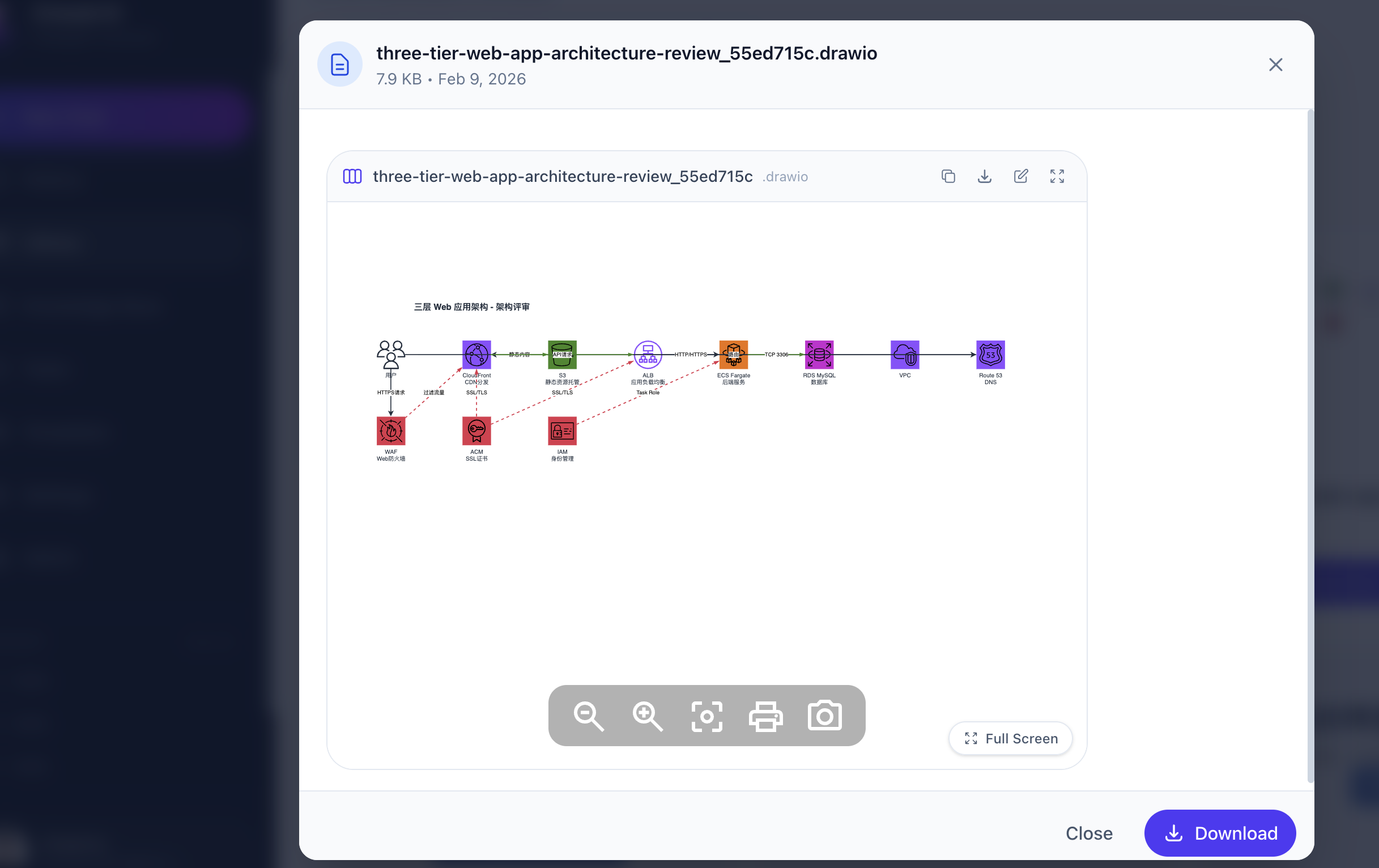 Agent-generated architecture diagram using AWS official SVG icons in Draw.io format.
Web Page Deployment
The Agent can deploy generated HTML/CSS/JS directly to S3 + CloudFront, giving users a shareable public URL.
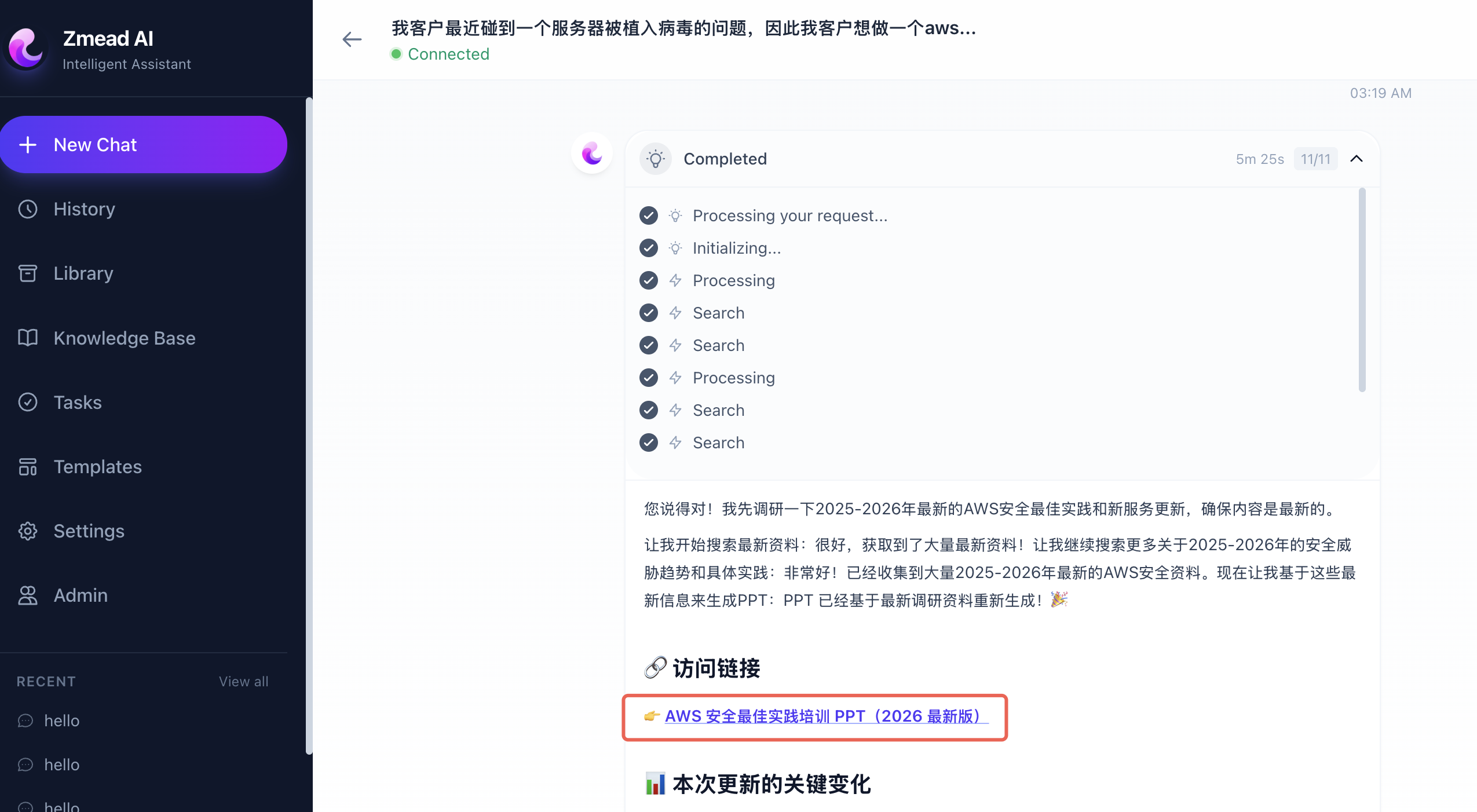 Agent receiving requirements in conversation, generating code, and deploying with one click.
 Deployed page with a shareable public URL via S3 + CloudFront, achieving end-to-end delivery.
Image and Video Generation
Through Stability AI and Luma AI models on Amazon Bedrock, the Agent generates images and videos directly.
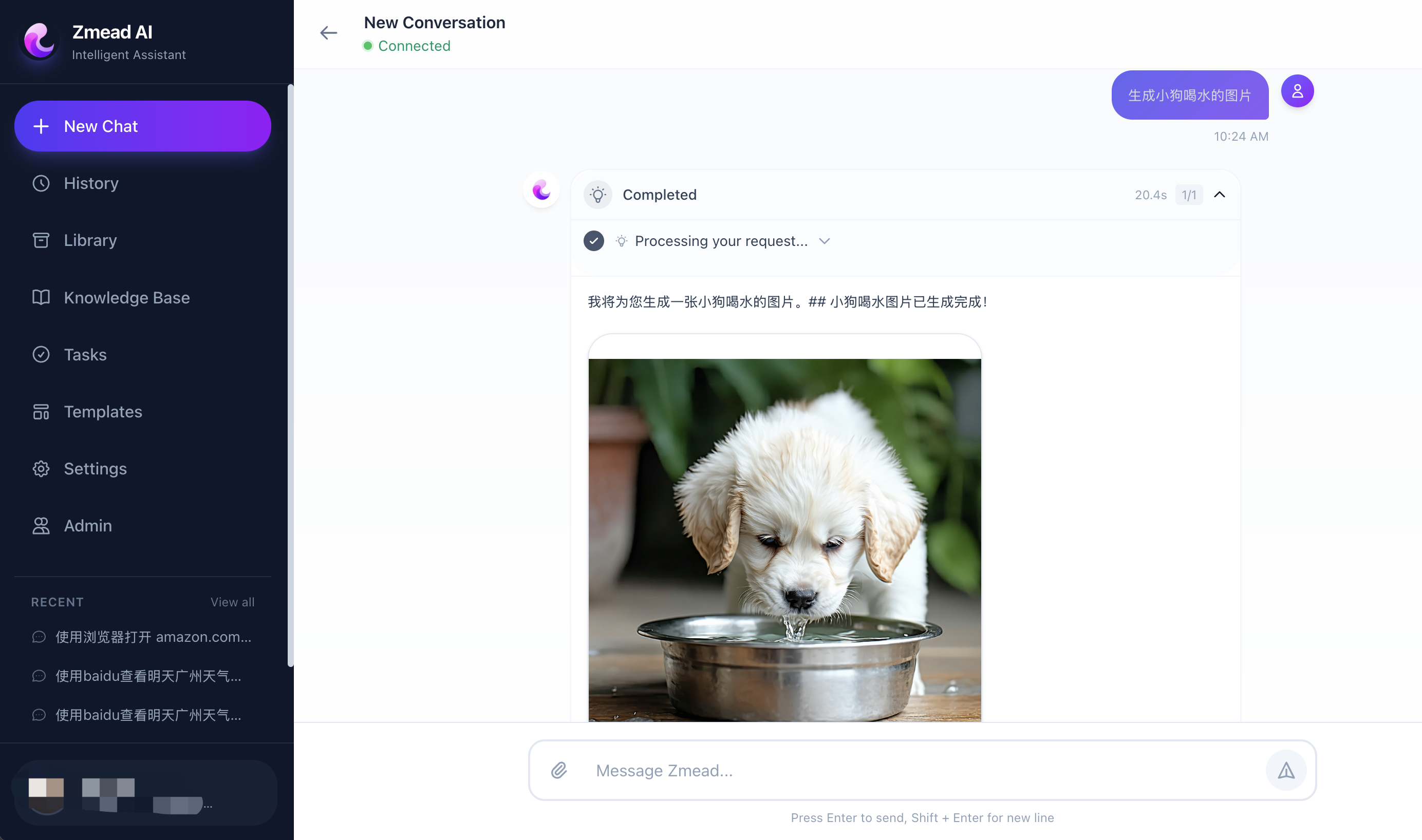 Agent generating images via Stability AI SD3.5 on Amazon Bedrock, results displayed inline in the conversation.
Lessons Learned
1. Let the LLM Decide — Don’t Over-Orchestrate
Early on we tried building rigid workflows — “if the user asks about pricing, route to the pricing tool.” This was fragile and couldn’t handle ambiguous requests. Strands Agents’ Agent Loop approach works better: give the LLM tools and a good System Prompt, let it decide the orchestration sequence. The model is surprisingly good at selecting tool sequences.
2. Fewer Tools, Better Decisions
We initially loaded all 15+ tools for every conversation. The LLM occasionally picked the wrong tool when faced with too many options. Dynamic loading based on Skills solved this — users enable the Skills they need, and only relevant tools are loaded.
3. Dual Execution Mode Is a Killer Feature
The same Agent code running locally (Direct Mode) and in production (AgentCore Mode) eliminates an entire class of “works on my machine” bugs. The abstraction cost is minimal — just one conditional in the WebSocket handler.
4. Streaming Is Non-Negotiable
Agent tasks can take minutes (generating videos, executing complex code, browsing multiple pages). Without WebSocket real-time streaming, users stare at a blank screen. We stream every event — thinking, tool selection, tool results, file creation — so users always know what’s happening.
5. Memory Makes the Agent Truly Intelligent
Without AgentCore Memory, every conversation starts from scratch. With it, the Agent remembers user preferences, past deliverables, and ongoing projects. This transforms the experience from “using a tool” to “collaborating with an assistant.”
Getting Started
If you want to build a similar platform, here’s the shortest path. We recommend using Kiro as your development tool — Spec-Driven Development auto-generates requirements, design, and tasks, then Vibe Coding implements them step by step.
1. Set Up a Strands Agent
pip install strands-agents strands-agents-tools
from strands import Agent, tool
from strands.models import BedrockModel

@tool
def my_tool(query: str) -> str:
    """Search for information."""
    return f"Results for: {query}"

agent = Agent(
    model=BedrockModel(
        model_id="us.anthropic.claude-sonnet-4-6",
        region_name="us-west-2",
    ),
    tools=[my_tool],
)
response = agent("Help me look up the latest EC2 pricing")
2. Connect AgentCore Runtime
pip install bedrock-agentcore
from bedrock_agentcore import BedrockAgentCoreApp

app = BedrockAgentCoreApp()

@app.entrypoint
async def invoke(payload: dict, context):
    agent = Agent(model=model, tools=tools)
    result = agent(payload["prompt"])
    yield {"type": "text", "data": {"content": str(result)}}

if __name__ == "__main__":
    app.run()

# Local testing
# agentcore configure --entrypoint app.py --name my_agent
# agentcore launch --local

# Deploy to production
# agentcore deploy
3. Deploy Infrastructure with AWS CDK
import * as cdk from 'aws-cdk-lib';
import * as ec2 from 'aws-cdk-lib/aws-ec2';
import * as ecs from 'aws-cdk-lib/aws-ecs';
import * as rds from 'aws-cdk-lib/aws-rds';

const vpc = new ec2.Vpc(this, 'Vpc', { maxAzs: 2 });
const cluster = new ecs.Cluster(this, 'Cluster', { vpc });
const db = new rds.DatabaseInstance(this, 'DB', {
  engine: rds.DatabaseInstanceEngine.mysql({ version: rds.MysqlEngineVersion.VER_8_0 }),
  vpc,
});
// ECS Fargate Service, ALB, CloudFront, ElastiCache...
A single CDK Stack defines VPC, ECS Fargate, RDS, ElastiCache, ALB, CloudFront, and all other production infrastructure. npx cdk deploy for one-command deployment.
Conclusion
Building an enterprise-grade Agentic AI platform used to require months of infrastructure work — container orchestration, sandbox execution, memory systems, auto-scaling. Now the entire pipeline can be AI-driven:
- Kiro handles the full development lifecycle — Spec-Driven Development generates structured specs, Vibe Coding handles daily iteration, MCP Servers provide real-time documentation
- Strands Agents provides clean tool abstractions and an Agent Loop, letting us focus on tool capabilities rather than framework details
- Amazon Bedrock AgentCore provides runtime, memory, and sandbox, saving months of infrastructure self-building
- AWS CDK makes the entire infrastructure reproducible, version-controlled, and one-command deployable
This isn’t just “using AI to assist development” — it’s using AI to build AI. Kiro as the developer built an AI Agent platform that delivers results for users. From a vague product idea to production deployment: one person, one week, zero hand-written code.
Source Code
The complete project code referenced in this article is open source:
- GitHub Repository: aws-samples/sample-for-bedrock-agentcore-strands-agents
References
Kiro (AI IDE)
- Kiro Official Site — AI IDE from AWS with Spec-Driven Development and Vibe Coding
- Kiro Documentation — Steering Files, Hooks, MCP integration guides
Strands Agents
- Strands Agents Quickstart — Build your first Agent in 20 minutes
- Custom Tool Development — @tool decorator patterns
- Deploy to AgentCore Runtime — Complete deployment example
Amazon Bedrock AgentCore
- AgentCore Runtime Overview — Runtime SDK architecture
- AgentCore Runtime Deployment — From local testing to production
- AgentCore Code Interpreter — Secure code sandbox
- AgentCore Browser — Managed browser tool
AWS Infrastructure
References
- Kiro documentation — Kiro
- Strands Agents — Strands
- Amazon Bedrock AgentCore Developer Guide — AWS Documentation