Adding a Unique Index to a 15-Million-Row MySQL Table: A Production War Story
We added a unique index to a 15M-row live table and caused an outage. Here's what went wrong and the right way to do it.
中文版 / Chinese Version: 本文最初发表于 CSDN 博客。阅读中文原文 →
Every DBA has a story about the ALTER TABLE that went wrong. This is mine. A 15-million-row production MySQL table, a unique index that needed to exist, duplicate data that said otherwise, and a critical mistake in the order of operations that brought down an entire application for 36 minutes.
This article tells that war story, then goes far beyond it — covering the modern tools and techniques that would have prevented every minute of that outage.
The Problem: Batch User Sync for a WeChat Platform
We were running a WeChat Official Account management system. The user_info table held profile data for every follower across all managed accounts — 15 million rows and growing. The core operation was user synchronization: pulling follower data from WeChat’s API and keeping our database in sync.
The original sync logic was painfully naive:
For each user:
  1. Call WeChat API to get user info        (~200ms)
  2. SELECT * FROM user_info WHERE openid = ? (~1ms)
  3. If exists → UPDATE. If not → INSERT.     (~1ms)
For a single Official Account with 300,000 followers, this meant 300,000 sequential API calls plus 600,000 database queries. Total time: roughly 14 hours. Completely unusable.
The optimization was obvious: use WeChat’s batch API (100 users per call) and MySQL’s batch upsert:
INSERT INTO user_info (openid, nickname, avatar_url, subscribe_time)
VALUES
  ('oX1...abc', 'Alice', 'https://...', '2023-06-01'),
  ('oX1...def', 'Bob',   'https://...', '2023-06-15'),
  ('oX1...ghi', 'Carol', 'https://...', '2023-07-20')
ON DUPLICATE KEY UPDATE
  nickname = VALUES(nickname),
  avatar_url = VALUES(avatar_url),
  subscribe_time = VALUES(subscribe_time);
This pattern — INSERT ... ON DUPLICATE KEY UPDATE — is MySQL’s native upsert. It inserts new rows and updates existing ones in a single atomic statement. But there is a critical prerequisite: the table must have a unique index (or primary key) on the column used to detect duplicates.
Our user_info table had a regular (non-unique) index on openid. That was fine for SELECT queries but useless for ON DUPLICATE KEY UPDATE, which requires a UNIQUE or PRIMARY KEY constraint to identify which row to update.
We needed to convert that regular index into a unique index. On a 15-million-row production table. With duplicate data already in it.
Why Unique Indexes on Large Tables Are Terrifying
Adding an index to a small table is trivial. Adding a unique index to a table with tens of millions of rows is an entirely different operation, and it can go catastrophically wrong in several ways.
The Locking Problem
In MySQL 5.6 and earlier, ALTER TABLE ... ADD INDEX used the COPY algorithm by default: it created a new copy of the entire table with the new index, then swapped it in. During this process, the table was locked for writes for the entire duration. On a 15M-row table, that could mean 30-60 minutes of complete write unavailability.
MySQL 5.6+ introduced Online DDL with ALGORITHM=INPLACE, which is significantly better — but even inplace operations acquire a brief metadata lock at the start and end of the operation, and they still consume significant server resources.
The Sort Buffer and Temporary Space
Building a unique index requires MySQL to:
- Read every row in the table
- Extract the indexed column values
- Sort them (to detect duplicates and build the B-tree)
- Write the index pages to disk
For 15M rows, this sort operation can consume gigabytes of temporary disk space and saturate CPU cores. On our 8-core, 16GB server with 300GB SSD, the sort phase alone was a significant bottleneck.
The Uniqueness Validation
Unlike a regular index, a unique index must verify that no two rows share the same value. If MySQL finds a duplicate during the ALTER TABLE, the entire operation fails and rolls back — after potentially running for 30+ minutes. You must clean your data before attempting the ALTER.
Business Impact
While the ALTER is running, every query touching that table competes for resources. Even with Online DDL, read queries slow down because the server is busy sorting and writing index pages. Write-heavy workloads suffer even more.
Modern Approaches (That We Should Have Used)
The incident happened in 2017. Today, there are much better tools for this. If you are facing a similar situation, do not run a raw ALTER TABLE on a large production table without considering these alternatives first.
pt-online-schema-change (Percona Toolkit)
Percona’s pt-online-schema-change (pt-osc) is the gold standard for zero-downtime schema changes on MySQL. It has been battle-tested at companies running tables with billions of rows.
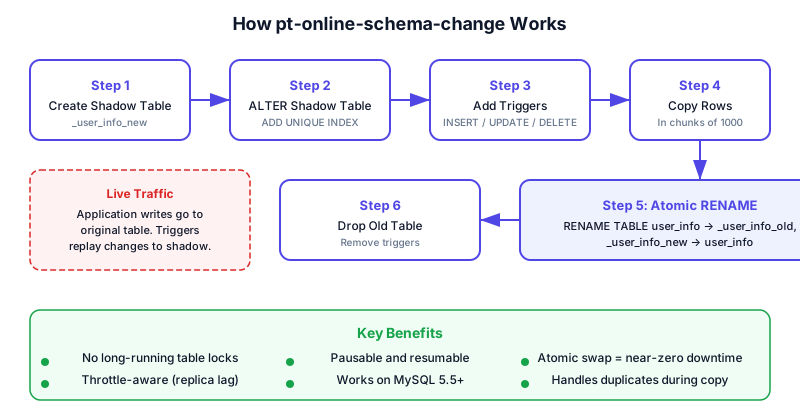
Here is how it works:
- Create a shadow table — An empty copy of the original table structure:
CREATE TABLE _user_info_new LIKE user_info - ALTER the shadow table — Apply the schema change to the empty shadow table (instant, since it has no data):
ALTER TABLE _user_info_new ADD UNIQUE INDEX openid_u_index(openid) - Add triggers to the original table — INSERT, UPDATE, and DELETE triggers that replay all changes to the shadow table in real time
- Copy rows in chunks — Copy data from the original table to the shadow table in small batches (default: 1000 rows). Between chunks, pt-osc checks replica lag and server load, throttling itself if the server is under stress
- Atomic rename — Once all rows are copied:
RENAME TABLE user_info TO _user_info_old, _user_info_new TO user_info - Drop the old table and triggers
The key insight: the shadow table is altered while empty (instant), and the rename is atomic (a metadata-only operation that takes milliseconds). The application never sees a moment without a valid user_info table.
pt-online-schema-change \
  --alter "ADD UNIQUE INDEX openid_u_index(openid)" \
  --user=dba --ask-pass \
  --chunk-size=1000 \
  --max-lag=1s \
  --check-interval=5 \
  --critical-load="Threads_running=100" \
  --set-vars="innodb_lock_wait_timeout=2" \
  D=mydb,t=user_info \
  --execute
Caveat for our case: pt-osc would have discovered the duplicate data during the copy phase and failed with a duplicate key error. We still needed to deduplicate first. But the ALTER itself would have been non-blocking.
gh-ost (GitHub Online Schema Transmogrifier)
GitHub’s gh-ost takes a different approach: instead of triggers, it reads the MySQL binary log to capture changes.
gh-ost \
  --alter="ADD UNIQUE INDEX openid_u_index(openid)" \
  --database=mydb \
  --table=user_info \
  --user=dba --ask-pass \
  --chunk-size=1000 \
  --max-lag-millis=1500 \
  --throttle-query="SELECT GREATEST(0, COUNT(*)-100) FROM information_schema.processlist WHERE command='Query'" \
  --initially-drop-ghost-table \
  --execute
Key advantages over pt-osc:
- No triggers — Triggers can cause performance problems on write-heavy tables, and some MySQL configurations restrict trigger usage
- Pausable — You can pause and resume the migration at any time via a Unix socket:
echo throttle | nc -U /tmp/gh-ost.mydb.user_info.sock - Testable — Run with
--test-on-replicato perform the entire migration on a replica first, verify the result, then run on the primary - Inspectable — Rich status output showing progress, ETA, and server load in real time
MySQL 8.0+ Online DDL (ALGORITHM=INPLACE)
MySQL 8.0 significantly improved its native Online DDL capabilities. For secondary indexes (including unique indexes), ALGORITHM=INPLACE is now the default:
ALTER TABLE user_info
  ADD UNIQUE INDEX openid_u_index(openid),
  ALGORITHM=INPLACE,
  LOCK=NONE;
With ALGORITHM=INPLACE, LOCK=NONE:
- The table remains fully readable and writable during the entire operation
- No table copy is created — the index is built in place
- A brief metadata lock is acquired only at the very beginning and very end
This is dramatically faster and less disruptive than the old COPY algorithm. However, there are important caveats:
- It still consumes significant I/O and CPU — The server must read all 15M rows to build the index
- It cannot be paused — Unlike gh-ost, once you start an inplace ALTER, you either wait for it to finish or kill it (losing all progress)
- It still validates uniqueness — Duplicate data will cause the entire operation to fail
When to Use Which Approach
| Scenario | Recommended Tool |
|---|---|
| MySQL 8.0+, low write traffic, can tolerate some performance degradation | Native ALGORITHM=INPLACE |
| MySQL 5.6/5.7, or high write traffic, or need zero-downtime guarantee | pt-online-schema-change |
| Write-heavy table where triggers would be problematic | gh-ost |
| Managed database (RDS, Aurora) where you cannot install external tools | Native Online DDL (often the only option) |
| Need to test migration on replica first | gh-ost with --test-on-replica |
The Deduplication Challenge
Before you can add a unique index, you must ensure no duplicate values exist. This sounds simple but is full of subtle traps.
Finding Duplicates
-- How many duplicate openid values exist?
SELECT openid, COUNT(*) AS cnt
FROM user_info
GROUP BY openid
HAVING cnt > 1
ORDER BY cnt DESC
LIMIT 20;
On our table, this query took about 45 seconds (full table scan with sort). We found several hundred openid values with 2-5 duplicate rows, plus a significant number of rows where openid was NULL.
Deciding Which Rows to Keep
This is the hardest part. For each set of duplicates, you need a deterministic rule:
Strategy 1: Keep the newest row (most common)
-- Delete all but the most recently updated row for each duplicate openid
DELETE u1 FROM user_info u1
INNER JOIN user_info u2
  ON u1.openid = u2.openid
  AND u1.id < u2.id
WHERE u1.openid IN (
  SELECT openid FROM (
    SELECT openid FROM user_info
    GROUP BY openid HAVING COUNT(*) > 1
  ) AS dupes
);
Strategy 2: Keep the row with the most complete data
-- Score each row by data completeness, keep the highest-scored
DELETE u1 FROM user_info u1
INNER JOIN (
  SELECT openid, MAX(id) AS keep_id FROM (
    SELECT id, openid,
      (CASE WHEN nickname IS NOT NULL THEN 1 ELSE 0 END +
       CASE WHEN avatar_url IS NOT NULL THEN 1 ELSE 0 END +
       CASE WHEN city IS NOT NULL THEN 1 ELSE 0 END) AS completeness,
      ROW_NUMBER() OVER (PARTITION BY openid ORDER BY
        (CASE WHEN nickname IS NOT NULL THEN 1 ELSE 0 END +
         CASE WHEN avatar_url IS NOT NULL THEN 1 ELSE 0 END +
         CASE WHEN city IS NOT NULL THEN 1 ELSE 0 END) DESC, id DESC
      ) AS rn
    FROM user_info
    WHERE openid IN (SELECT openid FROM user_info GROUP BY openid HAVING COUNT(*) > 1)
  ) ranked WHERE rn = 1
  GROUP BY openid
) keepers ON u1.openid = keepers.openid AND u1.id != keepers.keep_id
WHERE u1.openid IN (SELECT openid FROM (SELECT openid FROM user_info GROUP BY openid HAVING COUNT(*) > 1) d);
Strategy 3: Merge records before deduplication — If different duplicate rows have different non-NULL fields, merge them into the row you are keeping before deleting the rest.
Handling NULL Values
NULL values deserve special attention. In MySQL, a UNIQUE index allows multiple NULL values — two rows with openid = NULL do not violate a unique constraint (because NULL != NULL in SQL). However, having NULL openids in a user table is almost certainly a data quality issue.
-- How many NULL openids do we have?
SELECT COUNT(*) FROM user_info WHERE openid IS NULL;

-- Delete them (or move to a quarantine table first)
DELETE FROM user_info WHERE openid IS NULL;
The Safe Approach: Backup Before Deduplication
We created a backup table for the duplicate rows before deleting them. This turned out to be crucial:
-- Create a backup table with the same structure
CREATE TABLE user_info_duplicate LIKE user_info;

-- Copy all rows that have duplicates
INSERT INTO user_info_duplicate
SELECT * FROM user_info
WHERE openid IN (
  SELECT openid FROM (
    SELECT openid FROM user_info
    GROUP BY openid HAVING COUNT(*) > 1
  ) AS dupes
);
This backup table served as our safety net. After the unique index was created, we could restore the deleted rows using INSERT IGNORE — the IGNORE keyword silently skips any row that would violate the unique constraint.
The War Story: How We Brought Down the Application
With the preparation done, we had a plan:
- Backup duplicate rows to
user_info_duplicate - Delete duplicate rows from
user_info - Delete rows with NULL openid
- Drop the old regular index on openid
- Create the new unique index on openid
- Restore deduplicated backup data with
INSERT IGNORE
Steps 1-3 went smoothly. Then we made the critical mistake.
The Mistake
We executed step 4 — dropping the old regular index — before step 5:
DROP INDEX openid_index ON user_info;
-- At this moment, user_info has NO index on openid
-- Every query filtering by openid now does a full table scan of 15M rows
Then we started step 5:
ALTER TABLE user_info ADD UNIQUE openid_u_index(openid);
-- This took 36 minutes and 13 seconds
During those 36 minutes, the user_info table had no index on the openid column. Every query in the application that looked up users by openid — which was virtually all of them — went from a sub-millisecond indexed lookup to a full scan of 15 million rows.
The impact was immediate and severe:
- Query response times jumped from ~1ms to 30+ seconds
- The application’s connection pool filled up within seconds
- API endpoints started timing out
- The WeChat callback URLs stopped responding, which meant WeChat stopped sending us event notifications
- Error alerts started firing across every monitoring channel
We could not kill the ALTER TABLE without losing all progress and having to start over. We could not add the old index back because the ALTER had a metadata lock on the table. We were stuck, watching the progress counter crawl forward for 36 agonizing minutes.
Query OK, 0 rows affected (36 min 13.23 sec)
Records: 0  Duplicates: 0  Warnings: 0
What We Should Have Done
The correct order is to create the unique index first, while the old regular index is still in place:
-- Step 1: Create the unique index (old index still active, queries still fast)
ALTER TABLE user_info ADD UNIQUE openid_u_index(openid);
-- 36 minutes, but the old openid_index is still serving queries

-- Step 2: Verify the new index works
SHOW INDEX FROM user_info;
EXPLAIN SELECT * FROM user_info WHERE openid = 'oX1...abc';
-- Confirm the optimizer is using openid_u_index

-- Step 3: NOW drop the old index (the unique index has taken over)
DROP INDEX openid_index ON user_info;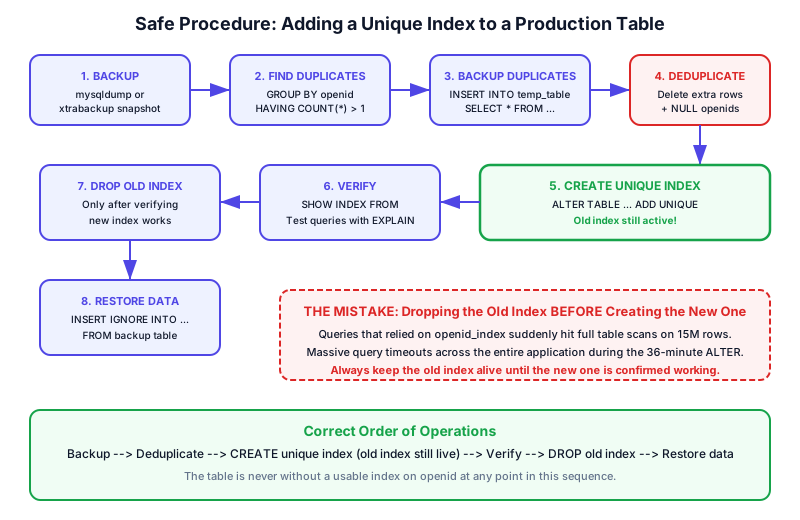
With this order, the table always has at least one usable index on openid. The ALTER TABLE still takes 36 minutes, but queries continue to use the old index throughout. No outage. No timeouts. No panicked Slack messages.
Step-by-Step Safe Procedure
Here is the complete, correct procedure for adding a unique index to a large production table with duplicate data. Follow this order exactly.
Phase 1: Preparation (Off-Hours, Low Traffic)
-- 1. Create a backup table for duplicate rows
CREATE TABLE user_info_duplicate LIKE user_info;

-- 2. Identify and backup duplicate data
INSERT INTO user_info_duplicate
SELECT * FROM user_info
WHERE openid IN (
  SELECT openid FROM (
    SELECT openid FROM user_info
    GROUP BY openid HAVING COUNT(*) > 1
  ) AS dupes
);

-- 3. Verify the backup
SELECT COUNT(*) FROM user_info_duplicate;
-- Should match the total number of rows involved in duplicates
Phase 2: Deduplication
-- 4. Delete duplicate rows (keep the one with the highest ID)
DELETE u1 FROM user_info u1
INNER JOIN user_info u2
  ON u1.openid = u2.openid AND u1.id < u2.id;

-- 5. Delete NULL openid rows
DELETE FROM user_info WHERE openid IS NULL;
DELETE FROM user_info_duplicate WHERE openid IS NULL;

-- 6. Verify no duplicates remain
SELECT openid, COUNT(*) AS cnt
FROM user_info
GROUP BY openid
HAVING cnt > 1;
-- Should return 0 rows
Phase 3: Index Creation (The Critical Part)
-- 7. Create the unique index while the old regular index is STILL IN PLACE
ALTER TABLE user_info ADD UNIQUE openid_u_index(openid);
-- This will take a long time. The old index keeps queries fast.

-- 8. Verify the new index
SHOW INDEX FROM user_info WHERE Key_name = 'openid_u_index';
EXPLAIN SELECT * FROM user_info WHERE openid = 'oX1...test';

-- 9. Only NOW drop the old regular index
ALTER TABLE user_info DROP INDEX openid_index;
Phase 4: Data Restoration
-- 10. Restore backup data (INSERT IGNORE skips duplicates)
INSERT IGNORE INTO user_info SELECT * FROM user_info_duplicate;

-- 11. Verify row counts make sense
SELECT COUNT(*) FROM user_info;

-- 12. Clean up (after a few days, once you are confident)
-- DROP TABLE user_info_duplicate;
Rollback Plan
If anything goes wrong during Phase 3:
-- If the ALTER fails (duplicate found that we missed):
-- The old index is still there, no harm done.
-- Find the remaining duplicates and fix them:
SELECT openid, COUNT(*) FROM user_info GROUP BY openid HAVING COUNT(*) > 1;

-- If you need to abort and restore all data:
INSERT IGNORE INTO user_info SELECT * FROM user_info_duplicate;
Monitoring During DDL Operations
When running a long ALTER TABLE, you need visibility into what is happening. Here are the essential monitoring commands.
Watch the ALTER Progress
-- MySQL 8.0+: Monitor ALTER TABLE progress via performance_schema
SELECT EVENT_NAME, WORK_COMPLETED, WORK_ESTIMATED,
  ROUND(WORK_COMPLETED / WORK_ESTIMATED * 100, 1) AS pct_complete
FROM performance_schema.events_stages_current
WHERE EVENT_NAME LIKE '%alter%';
Monitor Active Queries
-- Check for blocked queries
SHOW PROCESSLIST;

-- More detailed view (MySQL 5.7+)
SELECT id, user, host, db, command, time, state, info
FROM information_schema.processlist
WHERE command != 'Sleep'
ORDER BY time DESC;

-- Find queries waiting on metadata locks
SELECT * FROM performance_schema.metadata_locks
WHERE LOCK_STATUS = 'PENDING';
Track Server Load
-- InnoDB status (buffer pool, I/O, locks)
SHOW ENGINE INNODB STATUS\G

-- Key metrics to watch during ALTER
SHOW GLOBAL STATUS LIKE 'Threads_running';
SHOW GLOBAL STATUS LIKE 'Innodb_rows_read';
SHOW GLOBAL STATUS LIKE 'Created_tmp_disk_tables';
SHOW GLOBAL STATUS LIKE 'Innodb_buffer_pool_pages_dirty';
Check Index Usage After Migration
-- MySQL 8.0+: Find unused indexes (check after a few days)
SELECT * FROM sys.schema_unused_indexes
WHERE object_schema = 'mydb'
  AND object_name = 'user_info';

-- Verify query plans use the new index
EXPLAIN FORMAT=JSON
SELECT * FROM user_info WHERE openid = 'oX1...abc';
Set Up Alerts
Before starting the ALTER, set up monitoring thresholds:
# Watch for slow queries during the migration
tail -f /var/log/mysql/slow-query.log

# Monitor server load (should stay below 80% CPU)
mysqladmin -u root -p extended-status --sleep=5 | grep -E "Threads_running|Slow_queries"
The Aftermath: Was It Worth It?
After the unique index was in place and the application code was updated to use batch upsert, the numbers spoke for themselves:
| Metric | Before | After |
|---|---|---|
| Sync method | Sequential (1 user per API call) | Batch (100 users per API call) |
| Database operation | SELECT + conditional INSERT/UPDATE | INSERT ... ON DUPLICATE KEY UPDATE |
| Time for 300K users | ~14 hours | ~1 hour |
| Per-user cost | ~300ms (API call + 2 DB queries) | ~1ms (batched) |
| Speed improvement | Baseline | ~14x faster |
Each batch of 100 users took roughly 1 second end-to-end: about 500ms for the WeChat API call and 500ms for the batch database upsert. The sync went from an overnight job to something that could run during a lunch break.
Lessons Learned
Never remove a safety net before the replacement is in place. This applies to indexes, load balancers, feature flags, and everything else in production. The old index was our safety net. We removed it before the unique index was ready, and the application fell.
The order of operations matters more than the operations themselves. Every individual step in our plan was correct. The plan failed because of the sequence, not the content.
Estimate, then multiply by 3. Our DBA estimated “a few minutes.” It took 36. Always plan for the worst case, especially for operations that cannot be paused or rolled back.
Use the right tools. In 2017, we ran a raw ALTER TABLE on a live production table. Today, pt-online-schema-change and gh-ost exist specifically to solve this problem. Use them. They are free, battle-tested, and will save you from the kind of outage we experienced.
Deduplicate before you add the unique constraint. If the ALTER fails 35 minutes in because of one remaining duplicate row, you lose all that time. Run your deduplication queries, verify with GROUP BY ... HAVING COUNT(*) > 1, and only then start the ALTER.
Monitor everything. If we had been watching SHOW PROCESSLIST when we dropped the old index, we would have seen the full table scans starting immediately and could have reacted faster. Set up monitoring before you start, not after things go wrong.
The 36-minute outage was a formative experience. It taught our team more about production database operations than any number of documentation pages or conference talks. Sometimes the best lessons come from the worst mistakes.
If you are about to add a unique index to a large table — take a breath, double-check the order of operations, and consider whether pt-osc or gh-ost might save you from learning this lesson the hard way.
References
- CREATE INDEX statement — MySQL Reference Manual
- INSERT ... ON DUPLICATE KEY UPDATE — MySQL Reference Manual
- Use The Index, Luke — SQL indexing guide — Markus Winand